Top 10 TDD Pitfalls and How to Avoid Them
Avoid common TDD mistakes—unclear requirements, brittle tests, and poor automation—to keep tests valuable and design clean.

Test-Driven Development (TDD) can improve code quality and reduce bugs, but it often fails when common mistakes are made. Here’s a quick rundown of the top pitfalls and how to fix them:
- Unclear Requirements: Writing tests without understanding the code's purpose leads to fragile tests and wasted effort. Always define requirements first.
- Overly Complex Tests: Complicated test setups indicate design issues. Simplify tests and focus on isolating business logic.
- Unreadable Tests: Poorly named or unclear tests waste time. Use descriptive names and structure tests clearly.
- Chasing 100% Coverage: High coverage doesn't guarantee meaningful validation. Focus on critical areas, not trivial code.
- Manual Test Runs: Manual testing slows feedback. Automate tests to catch issues faster.
- Large Code Changes: Big changes between test runs disrupt TDD's iterative process. Take small, manageable steps.
- Vague Test Names: Ambiguous names confuse teams. Use names that describe behaviour clearly.
- Writing Tests After Code: Writing tests after implementation misses TDD's design benefits. Always write tests first.
- Mixing Test Types: Confusing unit and integration tests creates hybrid tests that are hard to maintain. Keep them separate.
- Focusing on Quantity Over Quality: Too many low-value tests add maintenance overhead. Prioritise meaningful tests over sheer numbers.
Key takeaway: TDD works best when tests are clear, focused, and written first. Avoid these mistakes to improve development speed, collaboration, and code reliability.
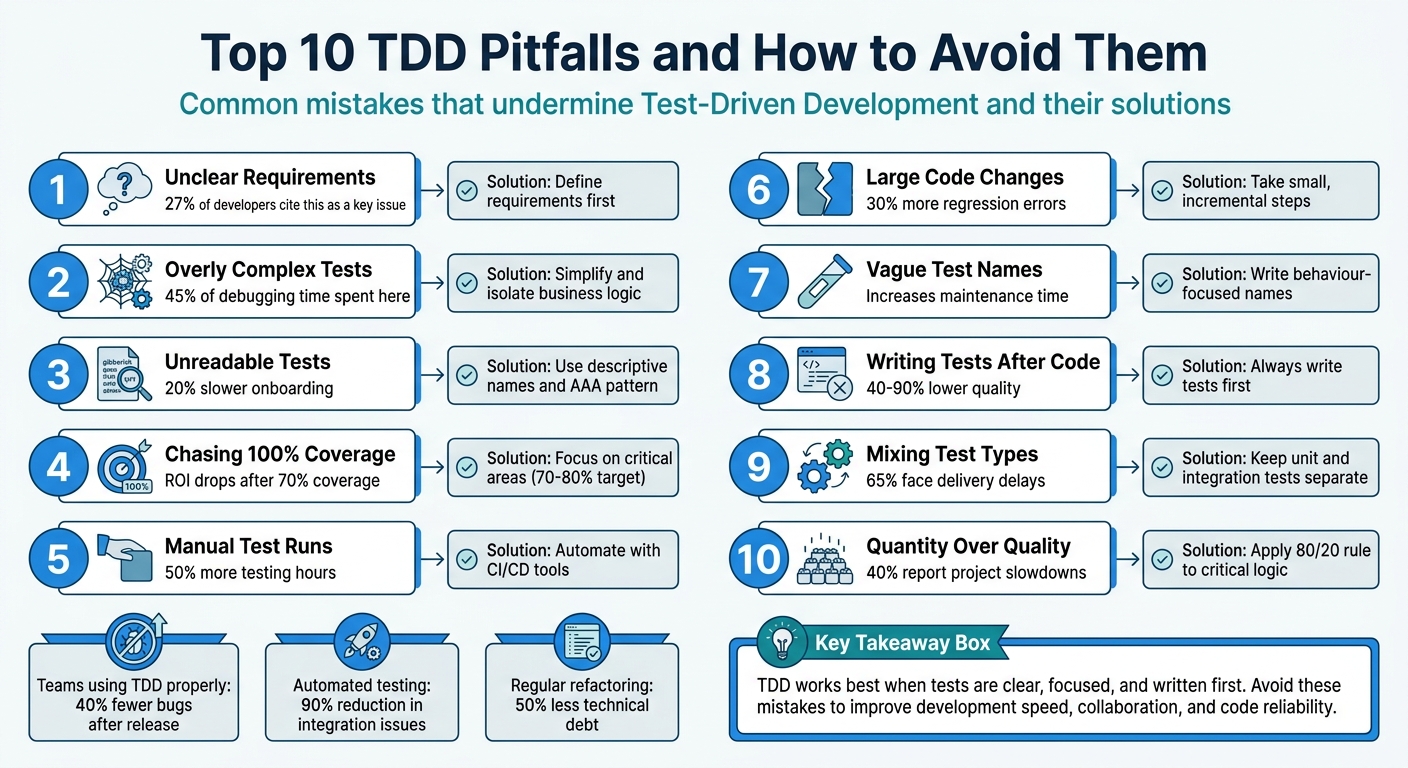
Top 10 TDD Pitfalls and How to Avoid Them
1. Writing Tests Without Clear Requirements
Jumping into writing tests without a solid grasp of what the code is supposed to achieve can lead to shaky foundations. Did you know that 27% of developers point to unclear requirements as a key reason for ineffective testing? And according to the Standish Group, 52% of software projects fail because requirements weren’t properly defined.
Impact on Code Quality and Maintainability
When tests are built on assumptions, they can create what Leon Pennings, a Java Solutions Architect, describes as "design handcuffs":
If you don't fully understand the domain yet, TDD will lock misunderstandings into your architecture. Test-first becomes mistake-first.
This approach often results in fragile tests that reinforce flawed designs, making future changes both harder and more expensive. It’s a classic case of the "The Liar" anti-pattern - tests that pass but don’t actually validate anything meaningful. These tests give a false sense of reliability, leaving you with code that’s not only harder to maintain but also more challenging to adapt as the project grows. This kind of design flaw doesn’t just weaken the codebase; it can also drag down the entire team’s productivity.
Effect on Team Efficiency and Collaboration
Unclear requirements don’t just hurt the code - they waste time and resources. When developers rely on guesswork, they often end up building the wrong thing entirely. To avoid this, it’s crucial to involve stakeholders early in the process. Techniques like user stories or acceptance criteria can help establish a clear framework. Validation workshops with key team members can also ensure everyone is on the same page before any tests are written. Tools like JIRA or Trello can help track and adapt requirements as they evolve.
In Test-Driven Development (TDD), the "Red" phase - where you write a failing test - requires a clear understanding of the behaviour you’re testing. Without well-defined requirements, you can’t confirm whether your test is targeting the right functionality. Always make sure your test fails for the correct reason before moving into the "Green" phase.
sbb-itb-1051aa0
2. Creating Tests That Are Too Complex
Tests that require excessive setup or mocking often signal underlying design issues. As Dave Farley explains:
TDD gives you the fastest feedback possible on your design... complicated tests reflect complicated code
When your tests are overly complex, it's usually a sign that your production code has problems. This might include God classes, breaches of SOLID principles, or hard-coded dependencies created with new inside methods. Such complexity doesn't just make maintenance harder - it also disrupts TDD's ability to provide quick, actionable feedback.
Impact on Code Quality and Maintainability
Complex tests often lead to tight coupling between your test suite and the implementation details of your code. This makes refactoring a painful process. For instance, 45% of debugging time is spent on issues tied to overly complex tests, while around 70% of technical debt stems from poorly written code and tests. When tests are too focused on how the code works rather than what it does, even minor refactoring can break them. This is especially true for tests that follow the "Giant" anti-pattern, where multiple assertions are bundled together. Such tests fail for several reasons at once, complicating maintenance and team collaboration.
Effect on Team Efficiency and Collaboration
Complex tests don't just affect code - they also slow down teams. They make onboarding harder for new developers and can reduce confidence in the test suite. When tests fail for irrelevant reasons, they become "unstable", and teams may start ignoring them altogether. On the flip side, well-isolated tests can run up to 60% faster.
Simplifying your tests can make a big difference. Follow the 80/20 rule: spend 80% of your testing efforts on critical business functionality rather than trivial code. Use dependency injection to pass dependencies into classes, making it easier to test with simple fakes. And remember, tests should be treated as the first user of your code. As quii, author of Learn Go with Tests, points out:
If testing your code is difficult, then using your code is difficult too. Treat your tests as the first user of your code
Focus on isolating business logic, testing only public behaviour, and keeping each test to a single logical assertion. If a test feels hard to write, it’s a sign that your design might need improvement.
3. Ignoring Test Readability and Documentation
Readable tests are a cornerstone of effective TDD. Just like clear requirements and straightforward implementation, tests need to be easy to understand. They double as living documentation, guiding developers through the system's behaviour. When tests lack clarity, they waste time and create confusion. As Bradley Braithwaite, a software architect, aptly states:
"It's better to have no unit tests than to have unit tests done badly."
Impact on Code Quality and Maintainability
Readable tests act as a safety net for maintenance. They outline expected behaviour, helping developers avoid introducing bugs when making changes. By focusing on what the code does rather than how it achieves it, tests remain relevant even after code refactoring. Software engineer Artem Polishchuk explains this well:
"If I can rewrite the internals completely and keep behaviour the same, my tests should stay green."
Unreadable tests, on the other hand, tend to break unnecessarily, masking their original intent. This often leads to "Assertion Roulette", where multiple vague assertions make it hard to pinpoint the exact cause of a failure. Clear, focused tests not only improve the overall quality of code but also make teamwork smoother and more efficient.
Effect on Team Efficiency and Collaboration
Well-written tests can significantly boost team productivity. For instance, clean test descriptions have been shown to reduce onboarding time by 20%. Similarly, projects that use automated tests as documentation experience 50% fewer misunderstandings during handovers.
To make tests more readable, consider the following practices:
- Use descriptive naming conventions like "Given_When_Then" or "MethodName_Scenario_ExpectedResult."
- Structure tests with the Arrange-Act-Assert (AAA) pattern, which separates setup, execution, and verification steps clearly.
- Avoid introducing logic such as if-else statements or loops in tests, as these can make them overly complex and hard to follow.
- Use fluent assertions to provide clear failure messages, such as "Expected total to be 42, but found 37", for faster debugging.
Additionally, simplify your tests by using test data builders or factories. This ensures that only the data relevant to the behaviour being tested is included, keeping tests concise and focused. By following these principles, your tests can serve as reliable, easy-to-understand documentation that supports effective TDD.
At Antler Digital, we emphasise the importance of readable tests in our development process. This commitment helps us create web applications that are both reliable and scalable.
4. Chasing 100% Test Coverage
The idea of achieving 100% test coverage might sound appealing, but in practice, it often creates more challenges than benefits. While high test coverage can tell you which lines of code have been executed, it doesn’t guarantee that those lines have been meaningfully validated. As John Ferguson Smart puts it:
"Code coverage only tells you which lines of code were executed, not whether the tests actually validate anything meaningful."
Impact on Code Quality and Maintainability
Focusing too much on reaching 100% coverage can lead to testing how code is written rather than what it’s supposed to do. This approach often results in fragile tests that fail whenever the code is refactored, even if the behaviour remains correct. The knock-on effect? Developers may hesitate to improve the codebase because fixing all the broken tests becomes a tedious and time-consuming task.
Research suggests that after 70% test coverage, the return on investment drops off significantly. That remaining 30% often involves testing trivial or non-critical code, which adds unnecessary maintenance work without boosting confidence in the system. Over time, this can make test suites harder to manage and less effective.
Effect on Team Efficiency and Collaboration
Striving for perfect coverage can weigh down teams with the upkeep of fragile tests, slowing down feature development and delivery. Interestingly, even systems with high test coverage can still face issues in production - around 25% of production bugs occur despite high coverage levels because tests often miss edge cases or focus on the wrong areas.
On the other hand, teams that prioritise meaningful and well-targeted tests, rather than obsessing over coverage percentages, can achieve 30% faster release cycles by leveraging continuous integration practices. This approach fosters better collaboration and allows developers to focus on delivering value rather than chasing arbitrary metrics.
Long-term Technical Debt Implications
Overemphasising test coverage can lead to bloated test suites that are more of a hindrance than a help. When tests are overly tied to implementation details, they become a barrier to change, turning what should be a safety net into a source of technical debt. Future developers may find themselves dealing with a mountain of low-value tests that demand constant updates but provide little real benefit.
Instead of chasing 100% coverage, aim for a balanced range of 70%–80%. Focus your efforts on critical areas like business logic and complex algorithms. This ensures that your tests provide meaningful validation without becoming a maintenance nightmare.
5. Running Tests Manually Instead of Automating
Relying on manual testing disrupts the smooth flow of TDD's "Red-Green-Refactor" cycle. This approach thrives on quick feedback, but manual testing slows things down and makes it harder to spot defects promptly.
Impact on Code Quality and Maintainability
Manual testing opens the door to human error. As your codebase grows, keeping track of all the moving parts becomes impossible without automated support. Automated test suites, on the other hand, run all tests - old and new - every time you make a change. This ensures that regressions don’t slip through unnoticed. Without automation, developers often hesitate to modify older code, fearing they might break something. This hesitation leads to a cluttered codebase full of unoptimised logic. As Darwin Manalo, a Full Stack Web Developer, aptly states:
Refactoring without tests is like operating without a safety harness - you're just hoping for the best.
The outcome is a fragile system where improving the structure feels too risky, leaving the code in a precarious state.
Effect on Team Efficiency and Collaboration
Automated testing doesn’t just improve code quality - it also transforms team dynamics. Companies that embrace test automation have reported cutting manual testing hours by up to 50%. This gives developers more time to focus on building new features rather than repeatedly validating old ones. Teams using CI/CD tools have seen even bigger benefits, like a 90% drop in integration issues and 30% faster release cycles. Manual testing, by contrast, slows everything down. Developers either skip tests under pressure or waste hours running them one by one, both of which hurt productivity and undermine the reliability of TDD’s feedback loop.
Long-Term Technical Debt Implications
Manual testing also speeds up the accumulation of technical debt. When testing takes too long - more than 30 seconds, for example - developers often skip it before committing their code, allowing bugs to stack up. Fixing bugs after deployment can cost 5 to 100 times more than addressing them during development. Research from 2008 involving Microsoft and IBM teams found that TDD with automated testing reduced pre-release defect density by 40% to 90%, demonstrating how the initial time spent setting up automation pays off in long-term quality gains.
To avoid these issues, integrate your tests with CI/CD tools like Jenkins or GitHub Actions to automatically run them with every push. Treat your test code as seriously as production code, and aim for unit tests that run in under a second to encourage frequent use. Start by automating the most critical business logic, applying the 80/20 rule to focus on areas with the biggest impact. Automation doesn’t just protect your codebase - it also strengthens teamwork and keeps TDD on track by providing consistent, reliable feedback.
6. Making Large Code Changes Between Test Runs
Making large code changes between test runs disrupts the Test-Driven Development (TDD) process. TDD thrives on small, iterative steps. When you write dozens - or even hundreds - of lines of code before running your tests, you sever the feedback loop that’s essential for keeping your design aligned with the principles of TDD. This disruption can derail the process, making it harder to spot and fix issues early.
Alignment with TDD Principles (Write Tests First, Refactor, Iterate)
TDD is all about using tests as a guide to shape your design. But when you make sweeping changes between test runs, you lose the chance to act on the feedback your tests provide. This delay makes it harder to identify which changes caused a test to fail, leading to longer debugging sessions.
Smaller, incremental changes are far more effective. Teams working with smaller commits experience 30% fewer regression errors, while projects that embrace incremental updates see a 60% higher success rate compared to those relying on large, all-at-once changes. These smaller steps allow you to focus on one behaviour at a time, reducing the mental strain of juggling multiple contexts simultaneously. Without this feedback loop, code quality inevitably suffers, as explored below.
Impact on Code Quality and Maintainability
Large code changes can lead to anti-patterns like the "Flash" and "Jumper", where developers either rush through the TDD process or take leaps so big that tests can no longer serve as a reliable safety net. Kent Beck, a pioneer of TDD, cautions against this:
Test methods should be easy to read, pretty much straight line code. If a test method is getting long and complicated, then you need to play 'Baby Steps'.
Overly complex tests are a significant time sink, accounting for 45% of total debugging time. Regular refactoring - an essential part of the TDD cycle - can cut technical debt by 50%. However, this benefit only materialises if you stick to small, manageable steps and avoid getting bogged down in debugging.
Long-Term Technical Debt Implications
The consequences of large code changes extend beyond immediate debugging challenges. Poor testing practices can lead to the accumulation of technical debt, with post-release fixes costing up to 100 times more than addressing issues during development.
To avoid these pitfalls, stick to the "One Test" rule: ensure only one new test fails at a time. Use "baby steps" to break down implementations into simple, manageable cases, and only refactor when all tests pass. Additionally, run your entire test suite regularly - not just the current failing test - to catch regressions early, before they snowball into more significant problems.
7. Using Vague Test Names
When it comes to writing tests, the importance of clear and precise naming cannot be overstated. Vague test names, like testTranslator or BasketTotal_Success, can create unnecessary mental strain for developers. This so-called "cognitive tax" arises because developers have to dig into the test file to figure out what’s actually being verified, which in turn increases maintenance time and effort.
Impact on Code Quality and Maintainability
Poorly chosen test names often tie directly to specific implementation details. For example, if a method is renamed during refactoring, the test name must also be updated. This added complexity can discourage developers from making necessary changes. Harold Abelson, co-author of Structure and Interpretation of Computer Programs, puts it best:
Programs must be written for people to read, and only incidentally for machines to execute.
By prioritising clarity in test names, you not only enhance the quality of your code but also make collaboration within the team far smoother.
Effect on Team Efficiency and Collaboration
Clear and descriptive test names can significantly improve team productivity. For instance, onboarding new developers becomes easier - up to 20% faster, according to studies. Instead of cryptic technical names like IsDeliveryValid_InvalidDate_ReturnsFalse, a name such as Delivery_with_a_past_date_is_invalid communicates the behaviour being tested in plain English. This clarity ensures that any team member, regardless of their familiarity with the codebase, can quickly verify if tests align with business requirements. Moreover, when a test fails, a descriptive name pinpoints the issue, cutting down debugging time.
Long-Term Technical Debt Implications
Vague test names also contribute to technical debt by making tests less effective as documentation. Rather than clearly outlining expected behaviours, they become puzzles for future developers to solve. To avoid this, test names should be written as if explaining the scenario to someone without technical expertise. If a business analyst can't grasp the intent behind a test name, it’s too ambiguous. Use snake_case formatting and avoid filler words like 'Should', 'Can', or 'Valid'. Clear naming not only improves documentation but also speeds up the Test-Driven Development (TDD) cycle by providing instant context when tests fail.
8. Writing Tests After the Code
Following Test-Driven Development (TDD) means writing your tests before the code, not as an afterthought. Writing tests after implementation goes against this principle, turning testing into a simple verification step rather than a design tool. When developers skip the test-first approach, they lose the valuable feedback loop that encourages simpler and more modular code structures.
Impact on Code Quality and Maintainability
When tests are written after the code, they often end up reflecting the current implementation rather than testing intended behaviour. This creates what’s known as the "Liar" anti-pattern - tests that give a false sense of quality. A study conducted by Microsoft and IBM researchers in 2008 revealed that teams practising TDD (writing tests first) delivered code that was 40% to 90% higher in quality, as measured by defect density.
By contrast, code written without a test-first mindset tends to lack proper interfaces or becomes riddled with dependencies. These issues make writing tests later far more challenging. This highlights why starting with tests is not just a best practice but a necessity for maintainable, high-quality code.
Alignment with TDD Principles (Write Tests First, Refactor, Iterate)
Matti Bar-Zeev, a Web Architect and Senior Frontend Developer, puts it succinctly:
Writing tests is not an additional task. It is an inseparable part of the development task for your feature.
When tests are written after the code, developers often hesitate to refactor their work. If a test written post-implementation uncovers a design flaw, the tendency is to adjust the test to fit the code rather than address the underlying issue. In such cases, the critical refactor step is skipped, leading to messy code, duplication, and shortcuts that accumulate over time. This neglect sets the stage for growing technical debt.
Long-Term Technical Debt Implications
Retrospective testing is often treated as a secondary task, resulting in lower-quality tests and an increase in technical debt. It’s estimated that 70% of technical debt stems from poorly written code and inadequate testing practices. Tests that focus on implementation details rather than behaviour become fragile, requiring frequent updates whenever internal code changes - even if the external behaviour remains consistent. Teams adhering to TDD principles report 40% fewer bugs after release compared to those who don’t.
| Aspect | TDD (Test-First) | Traditional (Test-After) |
|---|---|---|
| Technical Debt | Avoided through continuous refactoring | Accumulates rapidly; retrofitting tests is harder |
| Design Impact | Promotes modular, decoupled designs | Often results in complex, tightly coupled code |
| Feedback Loop | Immediate; catches bugs early | Delayed; bugs often surface during QA or in production |
| Cost of Fixes | Minimal during development | Significantly higher (up to 100x post-release) |
9. Mixing Up Unit Tests and Integration Tests
Building on earlier discussions about test complexity and naming issues, confusing unit tests with integration tests is another common pitfall that weakens Test-Driven Development (TDD). Unit tests are designed to evaluate individual functions or methods in complete isolation, often using mocks and stubs to eliminate external dependencies. In contrast, integration tests ensure that various components - like services, APIs, or databases - work together as intended in real-world workflows. When these two types of tests are mixed, the result is often hybrid tests with unclear goals, making maintenance much harder.
Impact on Code Quality and Maintainability
Blurring the lines between unit and integration tests disrupts TDD's fast feedback loop. Integration tests typically take much longer to run compared to unit tests. When a unit test fails, the issue is usually confined to a single method, making it easier to debug. However, when an integration or hybrid test fails, the root cause could be anywhere - business logic, database connectivity, network issues, or an external API - leading to time-consuming investigations. A study revealed that 65% of teams that confuse these test types face significant delays in their delivery timelines.
Hybrid tests also tend to be fragile, often failing due to external factors like unavailable databases rather than actual code regressions. This undermines the team's trust in the test suite. As Steven Sanderson highlights:
Unit tests are not an effective way to find bugs or detect regressions... Proving that components X and Y both work independently doesn't prove that they're compatible.
In TDD, unit tests are primarily a design tool to define behaviour, while integration tests are better suited for finding bugs and detecting regressions. Keeping these test types separate ensures TDD retains its rapid feedback loop.
Effect on Team Efficiency and Collaboration
Maintaining mixed tests can be a massive drain on resources. Hybrid tests often require up to 10× the maintenance effort compared to application code. Additionally, overly complex tests account for 45% of debugging time, significantly slowing down development. Teams frequently find themselves spending more time managing intricate test setups than developing new features. To avoid this, it’s essential to organise test suites effectively:
- Run unit tests early in the Continuous Integration (CI) pipeline for quick feedback.
- Reserve integration tests for later stages in staging environments.
Mocks and stubs should only be used for true external boundaries like databases, external APIs, or filesystems. For internal domain objects, rely on real implementations to prevent "over-mocking".
Long-Term Technical Debt Implications
The challenges of maintaining hybrid tests often lead to mounting technical debt. If developers lean on integration tests for straightforward logic because the code is too difficult to unit test, it signals that the code is overly coupled and needs refactoring. This lack of design feedback is a key contributor to technical debt. Organisations that separate test types and implement Continuous Integration effectively can reduce integration issues by as much as 90%.
The focus should always be on behaviour rather than implementation. Writing tests that validate what the system does - not how it does it - ensures that tests remain valid even during internal refactoring. Clear test distinctions, much like clear requirements, are critical to maintaining design integrity in TDD. By avoiding mixed tests, teams can preserve the efficiency and reliability that TDD promises.
10. Focusing on Test Quantity Over Quality
Chasing high test counts instead of meaningful tests is a common TDD misstep. It might seem logical to assume that more tests mean better quality, but that’s not always the case. A test suite overloaded with low-value tests can become a maintenance nightmare, offering little in terms of reliability. Similar to vague test names or excessive coverage, prioritising quantity over quality undermines TDD’s core purpose: validating behaviour.
The essence of TDD lies in creating tests that confirm how the system behaves, not how it’s built. When teams focus on quantity, they often end up testing trivial elements like getters, setters, or simple constructors. These tests add little value but demand constant upkeep, pulling developers away from meaningful work, like building new features.
Impact on Code Quality and Maintainability
Overemphasising test quantity often leads to fragile test suites that break during minor refactoring - even when the core functionality remains intact. This can create a false sense of security, where the “green” status of tests hides missed edge cases or flaws in business logic. Poorly written tests contribute to technical debt, mirroring the same issues they’re supposed to prevent. Additionally, redundant tests that require updates with every small change make the codebase harder to maintain.
Charlee Li captures this sentiment perfectly:
Quality is made by design, not testing.
Skipping the design phase to jump straight into writing tests can lead to a tenfold increase in bug-fixing costs later on. Beyond that, once test coverage exceeds 70%, the return on investment starts to diminish. Tests often fail to address real system validation at this point.
Effect on Team Efficiency and Collaboration
Low-value tests without clear validation criteria can sap TDD’s effectiveness. Debugging becomes more time-consuming, with poorly written tests accounting for 45% of debugging efforts. Tests that are hard to read, poorly named, or overloaded with assertions make it difficult for developers to identify issues. Around 40% of developers report that outdated or poorly maintained tests slow down project timelines significantly. This challenge is even greater for new team members, as such tests hinder onboarding and obscure system behaviour. Much like manual testing, these redundant tests weigh teams down with unnecessary maintenance.
The Pluralsight Content Team offers a word of caution:
The test is going to live as long as the production code, so it needs to be well-written. Taking shortcuts can come back to bite you in the future.
Alignment with TDD Principles (Write Tests First, Refactor, Iterate)
TDD follows the Red-Green-Refactor cycle, but an obsession with test quantity often leads teams to skip the critical refactoring step. Approximately 25% of developers fail to watch a test fail before making it pass, which can result in false positives that don’t genuinely validate behaviour. Even worse, 35% of junior developers may write just enough code to pass a test, compromising long-term quality for short-term success.
To stay aligned with TDD principles, teams should focus their testing efforts strategically. Following the 80/20 rule is a good approach: dedicate 80% of testing to critical business logic and complex algorithms, and only 20% to edge cases. Tests should also run quickly - ideally in milliseconds. If a test suite takes longer than 30 seconds to execute, developers may run them less frequently, disrupting the TDD feedback loop. Refactoring test code with the same care as production code is equally important to eliminate duplication and enhance readability.
Long-Term Technical Debt Implications
Regular refactoring can cut technical debt by as much as 50%, while focusing solely on test coverage can trap teams in a cycle of growing debt. The difference lies in prioritising meaningful tests that validate behaviour over chasing arbitrary coverage percentages.
Teams that follow TDD rigorously report 40% fewer bugs after release. However, this advantage only holds when tests are well-constructed and easy to maintain. Companies leveraging automated testing and continuous integration see up to a 50% reduction in manual testing hours - provided their test suites remain lean and focused on critical paths, avoiding the clutter of low-value tests.
Conclusion
Test-Driven Development (TDD) has the power to transform how software is built. The ten pitfalls highlighted earlier - ranging from unclear requirements to focusing on test quantity over quality - are some of the biggest barriers that can stop teams from fully benefiting from TDD. Tackling these challenges head-on can directly improve software quality, team collaboration, and development speed.
When done right, TDD can lead to impressive results. Teams that embrace it as a design tool, rather than an afterthought, report 40% fewer bugs after release. As Dave Farley aptly states:
TDD gives you the fastest feedback possible on your design.
This immediate feedback is invaluable, especially when fixing bugs after release can be incredibly costly.
Beyond just code quality, TDD fosters better collaboration. With tests acting as executable documentation, onboarding new team members becomes 20% quicker and misunderstandings during handovers drop by 50%. These improved workflows can boost overall team productivity by up to 25% and even cut project timelines in half when compared to traditional development methods.
Adopting the Red-Green-Refactor cycle is essential, as is regularly reviewing and refining your approach. Teams using continuous integration with automated testing report a 90% reduction in integration issues, while refactored codebases can cut technical debt by half. To focus your efforts wisely, apply the 80/20 rule: devote 80% of your testing to critical business logic and 20% to edge cases. Bradley Braithwaite’s cautionary words are worth keeping in mind:
It's better to have no unit tests than to have unit tests done badly.
Start small, improve as you go, and let your tests shape smarter design choices.
FAQs
How do I clarify requirements before writing tests?
In Test-Driven Development (TDD), getting the requirements right from the start is critical. This means having a clear grasp of the project's specifications before you even begin. The best way to avoid misunderstandings is to involve stakeholders early in the process. By doing this, you can align everyone on the project's goals and eliminate the risk of working on incorrect assumptions.
It's also important to break down the work into small, manageable pieces. Focus on writing tests for specific, well-defined units of code. Alongside this, keep detailed documentation to record the requirements accurately. This approach ensures that your tests are grounded in the actual needs of the project, not guesswork or vague ideas.
What should I test first in a TDD workflow?
In a Test-Driven Development (TDD) workflow, the best approach is to begin with the smallest, most specific units of code. Concentrate on creating unit tests for individual components or functions. These tests are designed to confirm specific behaviours or functionalities, ensuring they work as expected.
By focusing on these smaller pieces first, you can catch issues early, making debugging far easier. Once these foundational elements are solid, you can confidently progress to tackling more complex areas of your code.
When should I use unit tests vs integration tests?
In Test-Driven Development (TDD), unit tests focus on checking individual components or functions in isolation. These tests are designed to ensure that each piece of the code works as expected on its own. They're typically small, run quickly, and are excellent for catching bugs early in the development process.
On the other hand, integration tests evaluate how different components work together. They confirm that communication between parts of the system is seamless and that data flows as intended. While unit tests are great for validating specific pieces of code, integration tests provide an additional layer of confidence by verifying that the system operates correctly as a whole.
if (valuable) then share();