TDD and BDD in CI/CD: Best Practices
Fast TDD for commit checks and BDD later for business validation; keep unit tests small, quarantine flakes and map suites to stages.

If I want CI/CD to move fast and stay under control, I use TDD early and BDD later.
Here’s the short version: TDD checks code at commit and merge time, while BDD checks business behaviour before release. That split keeps feedback tight, cuts avoidable delay, and gives teams a clear audit trail. In the article, the main targets are plain: unit checks under 5 minutes, flake rate under 2%, and a test mix of roughly 70–80% unit, 15–20% integration/API, and 5–10% E2E.
What I’d take from it is this:
- Use TDD as the first gate for unit-level checks
- Use BDD as the later gate for user and business flows
- Keep unit tests small, stable, and isolated
- Run only the tests linked to a change where possible
- Quarantine flaky tests instead of retrying them
- Write BDD scenarios in plain business language
- Keep feature files reviewed, owned, and up to date
- Match test data and settings to UK use cases like
dd/mm/yyyy,en-GB, VAT, and GBP - Track ownership, false failures, and defect escape over time
A simple way to think about it: TDD asks “does the code work?”; BDD asks “did we build the right thing?”. Put both in the right pipeline stage, and you get a setup that is easier to trust, easier to review, and less likely to let defects slip into production.
The rest of the article breaks that into 12 practical steps for branch rules, quality gates, test speed, suite placement, data, and team ownership.
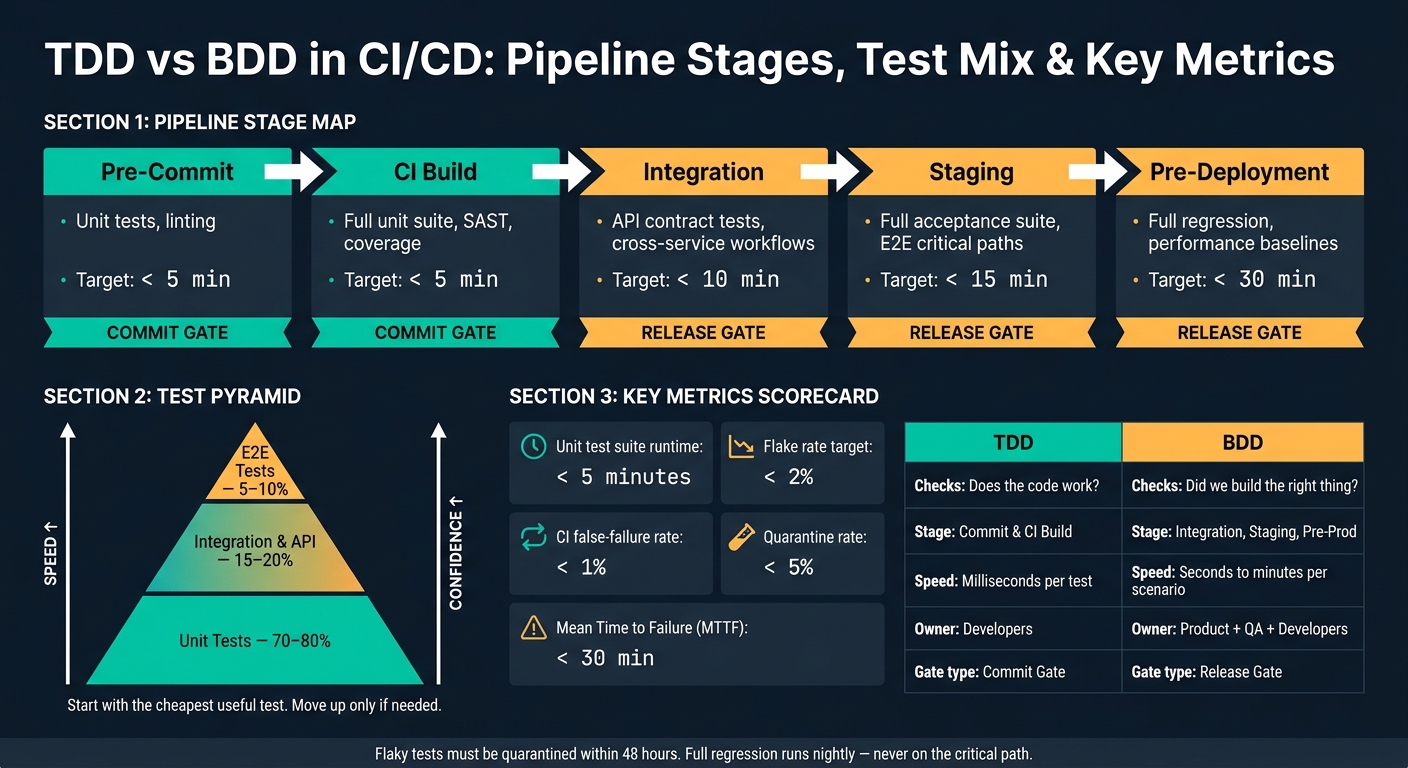
TDD vs BDD in CI/CD: Pipeline Stages, Test Mix & Key Metrics
How TDD and BDD support continuous delivery
TDD gives fast feedback at unit level. BDD checks business behaviour later in the pipeline. That split matters because each one fits a different stage of delivery.
TDD catches code-level defects early. BDD checks that the release still lines up with business intent.
A simple way to handle this is to use TDD as the commit gate and BDD as the release gate. One protects the code as it changes. The other checks the product before it goes live. That’s how you turn the split into practical pipeline rules instead of leaving it as theory.
Used together, they cut defects and help teams ship more often.
In practice, that means making passing unit tests mandatory for merge approval and passing BDD scenarios mandatory before production release. The next practices show how to assign those checks across branches, tests and release stages.
sbb-itb-1051aa0
1. Assess whether external delivery support is needed
Once TDD and BDD are tied to pipeline goals, the next step is simple: check whether the team can run them well in-house.
External delivery support makes sense when the pipeline is slow, flaky or no one trusts it.
Here’s a common warning sign. If developers keep rerunning failing builds instead of fixing the root cause, the pipeline is probably flaky. A failure rate above 2% or a commit-to-feedback loop longer than 10 minutes points to pipeline instability.
BDD can go wrong too. If business stakeholders never read or validate Gherkin scenarios, the team has performative BDD. In that case, the BDD layer adds cost without adding value.
Another red flag is defect leakage. If defects still show up during acceptance testing or in production, the pipeline is not shifting feedback left.
Teams that don’t yet have the right mix of test automation, DevOps and infrastructure skills should bring in external delivery support for pipeline design, test automation and infrastructure. But if the pipeline is still unstable, fix the alignment between TDD, BDD and delivery goals before piling on more tests.
2. Align TDD and BDD with pipeline goals
Before you add more tests, get clear on the job each method is doing. TDD protects code quality. BDD protects business intent. Once that line is clear, it becomes much easier to decide where each test belongs in the pipeline.
A simple rule works well here: run TDD first, then BDD later. TDD unit tests should run at the pre-commit and CI build stages. They’re fast, focused, and good at flagging code issues early. BDD scenarios usually take seconds or minutes, so they fit better in integration or staging stages. That fast-first setup helps the pipeline keep moving without giving up test coverage.
BDD earns its place by tying each scenario to a business requirement and an executable test. That link can expose critical defects sooner and cut down the effort needed in acceptance testing. In plain terms, TDD checks whether the code works; BDD checks whether the right thing was built.
The split looks like this:
| Goal | Methodology | Stage | Measure |
|---|---|---|---|
| Speed | TDD (unit tests) | Pre-commit / CI Build | Execution time < 5 minutes |
| Reliability | TDD | CI Build | Failure rate, code coverage |
| Flake resistance | Both | All stages | Flake rate < 2% |
| Traceability | BDD (scenarios) | Integration / Staging | Scenario pass rate vs requirements |
| Release confidence | BDD / E2E | Pre-deployment | Production defect rate, mean time to failure (MTTF) < 30 min |
If tests fail on and off, don’t let them block delivery until they’re fixed. That kind of noise slows teams down and makes people stop trusting the pipeline. Once you’ve set the stage map, lock it in through branch policy and merge checks.
3. Enforce test-first development in feature branches
Once your pipeline goals are set, make test-first rules part of daily work in feature branches. A good place to start is with pre-commit hooks that run unit tests locally before any code is pushed.
After that, your CI server should run the required tests on every feature-branch push and fail the build if anything breaks.
The workflow inside the branch matters too. Use an outside-in flow: write the BDD scenario first, then the TDD unit tests. That keeps the code tied to the business goal instead of drifting into “build it first, justify it later”.
For work that is still mid-build, mark unfinished acceptance tests as pending so they don’t hold up delivery. That way, the pipeline can still run finished tests, while pending scenarios stay out of the way until the feature flag is live.
Keep the commit-stage runtime under five minutes. If that sounds tight, the trick is to avoid slow dependencies where you can. Use:
- in-memory databases
- mocks
- Testcontainers instead of live services
If your setup allows it, parallelise test suites across multiple runners to cut wait time even more.
Not every change needs the same level of proof. For high-risk logic, such as payments, require full end-to-end validation. For low-risk UI changes, a unit test pass and a smoke check may be enough.
4. Keep unit tests fast and deterministic
Unit tests need to be fast and predictable. A single unit test should finish in milliseconds. That’s why unit tests belong at the very start of the pipeline. If the first gate is slow, everything behind it slows down too.
For TDD to work well, feedback has to stay local and near-instant. Run unit tests in isolation. They shouldn’t rely on a database, external services, or a full runtime setup. Swap those dependencies out with test doubles - stubs, mocks, or fakes - so the code can run in memory.
A flaky test gives different results even when the code, inputs, and setup stay the same. That’s a red flag. Shared state, timing issues, randomness, and hidden environment assumptions are common causes. A few simple habits help a lot:
- Use fresh test data
- Seed random sources
- Inject the clock
- Set
TZ=UTCin CI to avoid date-based failures
Use Test Impact Analysis (TIA) to keep the suite inside its time budget by running only the tests touched by a change. Unit tests should account for 60–70% of the total automated test suite, so keeping them efficient is what lets the test pyramid grow without slowing delivery. That speed matters before the broader test layers step in.
Never retry flaky unit tests automatically. Flaky unit tests break TDD feedback and need to be isolated straight away. Do not retry flaky unit tests automatically. Quarantine them in a separate non-blocking suite, report the failures, and fix the root cause before putting them back. Once unit tests stay stable, the next layer can focus on broader behavioural checks.
5. Use the testing pyramid to balance feedback speed
Use the testing pyramid to keep CI/CD feedback fast at the bottom and strict at the top. If your unit tests are already in good shape, the pyramid helps you decide how far each check needs to go.
A balanced pipeline usually aims for 70–80% unit tests, 15–20% integration tests, and 5–10% E2E tests. Start with the cheapest useful test, then move up the stack only if you need to.
Once the base is steady, the bigger risk is pushing too much validation to the top. That’s where teams often get stuck. They pile on E2E tests, and the pipeline slows to a crawl. When execution times go past 15–30 minutes, developers start skipping tests or stop waiting for feedback.
The rule is simple: prove the point as low in the stack as possible. That keeps feedback cheap enough to support frequent merges. Save E2E tests for the journeys that matter most, like login, checkout, and core transactions.
| Pipeline Stage | Test Types | Target Duration |
|---|---|---|
| Pre-commit / CI build | Unit tests, linting, SAST | < 5 minutes |
| Post-build / integration | Integration tests, API contract tests | < 10 minutes |
| Staging / E2E | Smoke tests, E2E/BDD (critical paths) | < 15 minutes |
| Pre-deployment | Full regression, performance baselines | < 30 minutes |
Once you’ve set the right balance across the layers, the next move is to enforce it with merge and deployment gates.
6. Add code quality gates to every merge and deployment
Quality gates stop merges or deployments when tests, coverage, or security checks fail. With branch protection or required merge-request approvals, those checks become mandatory. That matters because it turns the test pyramid into an enforceable delivery control, not just a model on a slide.
Tie each gate to a delivery stage. A commit gate should finish in under 2 minutes and cover linting plus impacted unit tests. A PR gate should complete within 10 minutes, adding the full unit test suite, API contract checks, and coverage thresholds on changed files. Then a merge gate can run parallelised E2E tests and performance budget checks, ideally within 30 minutes. The pattern is simple: lower layers are cheaper, while upper layers give stronger confidence, which lines up with the pyramid.
One detail makes a big difference in practice: gate the diff, not the total. If you set an 80% coverage threshold on new or changed code instead of the whole repository, you avoid penalising teams for legacy debt they didn’t create. That keeps the focus on steady improvement rather than a single repo-wide percentage.
BDD needs a slightly different lens. The gate should show business impact, not only a red or green test result. BDD scenarios add business traceability that pass/fail counts can’t provide. If a BDD scenario fails, the team can see which business behaviour is at risk straight away, which makes triage faster and clearer.
A sensible rollout is to start new gates in warn mode first, then move them to blocking once teams have had time to adjust.
7. Write BDD scenarios in shared business language
Quality gates only help if the scenarios behind them read like clear business rules. And BDD scenarios only matter when product, testing, and engineering all read them in the same way.
BDD scenarios written in Given-When-Then format give developers, testers, and product owners one readable specification they can all check. The goal is simple: describe behaviour, not implementation.
Three Amigos sessions help product, development, and testing line things up before code is written. That cuts requirement drift and brings critical defects to the surface earlier. Each scenario should check one behaviour at a time, which makes debugging easier and also lets teams run scenarios in parallel in the CI/CD pipeline.
A simple example shows the difference. Write:
"When the user submits their credentials"
not:
"When the user clicks the blue login button."
The first line describes a stable business action. The second is tied to a UI detail that may change often.
To keep shared scenarios easy to work with, avoid step definitions linked to just one feature. Reuse steps where you can, and use the Examples keyword to keep scenarios lean. That kind of consistency is what makes feature files useful as living documentation.
8. Treat feature files as living documentation
Feature files work as living documentation because they’re executable. When behaviour changes, a scenario fails. That failure tells you something plain and useful: either the code is off, or the specification is.
That link only works if people trust it. And trust tends to fall apart when no one owns the files.
Keep feature files in the same repository as your application code. Put them through the same pull request review process too. If the code needs review, the specs should as well.
Appoint a business owner and a technical owner for each set of feature files. Without clear ownership, scenarios go stale quietly. No alarm bells. No drama. They just stop matching what the system does or what the business still cares about.
A quarterly review helps cut that drift back. Use it to:
- delete scenarios that no longer matter
- merge duplicates
- rewrite cases that no longer match current behaviour or business value
Outdated scenarios are delivery debt, not admin work. That’s the mindset shift. You’re not tidying documents for the sake of it. You’re keeping the shared record of system behaviour in step with the product.
Tools like Allure or SpecFlow LivingDoc can turn test results into dashboards, so stakeholders can see which behaviours are passing right now. That makes the status far easier to read than digging through raw test logs.
It also helps to tie those dashboards straight into release control. A blocking CI/CD gate that stops deployment when critical BDD scenarios fail keeps feature files tied to what the system does today. Use failures to sort issues into three buckets: new functionality, regressions, and outdated intent. Then map those living documents to the pipeline stage that can act on them fastest.
9. Map BDD suites to the right CI/CD stages
Feature files work best as living documentation when each suite runs at the point where it helps most. That matters because not every BDD scenario should run at every stage. If you fire the full suite on every pull request, feedback slows to a crawl.
A better approach is to start with a tight PR gate, then widen coverage as code gets closer to release. At the pull request stage, run only @smoke-tagged scenarios and other selective behavioural checks for changed modules. Focus on core paths like login, checkout, search, and key API behaviours. These checks should finish in under 5–10 minutes so developers aren’t left waiting around.
After the code is merged, widen the net. The integration stage suits cross-service workflows and business rule checks. Then, in pre-production or staging, run the full acceptance suite for key end-to-end business flows and external integrations. After deployment, keep things lean: smoke tests and synthetic monitoring are enough for deployment validation and day-to-day health checks.
Flaky scenarios need their own policy. Don’t let unstable tests block the pipeline, and don’t shrug and ignore them either. Quarantine them in a separate non-blocking job, away from the PR gate, then fix the root cause before putting them back into your quality checks. Using ephemeral environments such as Testcontainers for each run, and keeping state local to one scenario, can cut intermittent failures.
Full regression should sit outside the critical path and run on a schedule. The matrix below shows where each BDD suite fits best.
| Pipeline Stage | BDD Suite Scope | Execution Time | Primary Goal |
|---|---|---|---|
| Pull Request | Smoke / @quick scenarios |
Seconds to minutes | Fast gating; catch major regressions |
| Merge / Integration | Cross-service workflows, business rules | Minutes | Validate service collaboration |
| Pre-Production / Staging | Full acceptance suite, environment validation | Long-running | Business validation across the whole flow |
| Post-Deployment | Smoke tests, synthetic monitoring | Seconds | Production health and availability |
| Nightly / Scheduled | Full regression suite | Non-blocking scheduled run | Deep coverage without blocking delivery |
10. Use realistic UK-focused test data and environment parity
Generic test data can give you a false sense of safety. It often misses the kinds of defects that show up in production, where users enter dates as dd/mm/yyyy, money appears in GBP, and systems need to handle UK formats properly. That’s why your test data should use en-GB locale settings, steady UK timezone handling, realistic fixtures such as SW1A 1AA, correct £ values with two decimal places, and VAT rules that match actual business logic, rather than hardcoded strings or made-up postcodes.
When BDD scenarios use data that looks like the data your service will face in the wild, they prove far more. You get fewer false passes and fewer nasty surprises near release. The same idea applies to the environment itself, not just the data inside it.
GOV.UK Pay used BDD to define Welsh-language payment rules, including valid and invalid language codes, making those business rules directly executable in the pipeline. That kind of precision shouldn’t stop at the feature file. It needs to show up in CI, staging and pre-production too.
Test data is only half the story. Each environment also needs to behave in the same way. Local, CI, staging and pre-production should use the same locale settings, environment variables and integrations, while pre-production should mirror production scale and configuration as closely as possible. If one environment handles dates, tax or language settings a bit differently, bugs can slip through without anyone noticing.
To keep delivery moving, use stubs or virtual services in earlier stages of the pipeline. That keeps tests fast without giving up too much confidence. At the same time, all non-production environments should use anonymised or fully synthetic data, and live PII should stay out of those environments altogether, in line with the UK Data Protection Act and GDPR.
It also helps to check for drift on a regular basis. A small manual tweak in staging might seem harmless, but it can quietly push that environment away from production and make test results far less useful.
11. Speed up pipelines with selective test execution
Once your stage map is in place, the next step is selective execution. The idea is simple: run only the tests touched by a change. That keeps feedback fast, avoids running the whole suite on every commit, and helps keep the TDD loop tight. It also makes sure the right BDD scenarios run at the right stage.
A full regression suite can take 40 minutes or more. Selective runs often finish in under five minutes.
In practice, that usually means running fast unit and integration tests on every push, while saving broader BDD and E2E suites for pre-merge and staging. Tools such as Nx, Bazel, or jest --changedSince can trigger only the tests linked to a change. You can also use tags to call the right behavioural checks at each stage.
Risk should drive how far you go. A change to a payment flow or an authentication service needs broader coverage. A copy tweak to a UI label probably doesn't need a full E2E run. That balance helps teams keep PR feedback fast without going blind on higher-risk work.
It also helps to keep one full run on main or in a nightly build to catch edge cases that selective rules can miss. Then track misses and false positives over time, so your selection rules get sharper instead of drifting.
12. Track test ownership, flakiness and improvement over time
Selective execution only works when every test has a clear owner and a clear route to a fix. If nobody owns a test, it tends to drift. And when it fails, people waste time working out who should deal with it.
A simple way to handle this is by test layer. Developers own unit tests because they shape the code and check internal logic. Engineering owns integration tests. BDD and acceptance tests need shared ownership: product managers or business analysts own the business intent, while QA and developers own the automation and technical hooks. Put even more plainly: developers own unit tests, engineering owns integration tests, and product plus QA own BDD scenarios.
Flaky tests are the biggest threat to trust in the pipeline. If people stop believing the signal, the whole gate starts to lose its point. Track flaky tests, quarantine them, and fix them within 48 hours before moving them back into the gate. Don't keep rerunning them and hoping for a clean pass. Move them into a non-blocking quarantine, tag them - for example, @flaky - and link each one to a tracking ticket.
If your quarantine list keeps growing, that is a signal your real coverage is quietly shrinking.
For steady improvement, track a small set of metrics and stick with them:
- Flaky test rate under 2%
- Quarantine rate under 5%
- CI false-failure rate under 1%
Then pair those with DORA metrics - Change Failure Rate and Mean Time to Restore - so test health is tied to delivery results. Each production escape should lead to a new test that closes the gap. That gives you a simple way to judge which checks belong in the gate and which ones still need work before people can rely on them.
Where each practice fits in the pipeline
The list above only works if each practice sits in the right pipeline stage. Put a check too early and you slow everyone down. Put it too late and problems slip through. The goal is simple: keep pipelines fast without giving up control.
TDD sits at the front of the pipeline. BDD sits where business behaviour needs to be checked. In practice, that means TDD for commit-level checks and BDD for later behavioural validation. The table below shows where each practice fits, and whether it mainly helps with fast feedback or release confidence.
| Practice | Commit | PR | Nightly | Staging | Pre-Prod | Feedback Type |
|---|---|---|---|---|---|---|
| 3. Enforce test-first development in feature branches | ✓ | Fast Feedback | ||||
| 4. Keep unit tests fast and deterministic | ✓ | ✓ | Fast Feedback | |||
| 5. Use the testing pyramid to balance feedback speed | ✓ | ✓ | ✓ | Fast Feedback | ||
| 6. Add code quality gates to every merge and deployment | ✓ | ✓ | ✓ | Both | ||
| 7. Write BDD scenarios in shared business language | ✓ | ✓ | Release Confidence | |||
| 8. Treat feature files as living documentation | ✓ | ✓ | Release Confidence | |||
| 9. Map BDD suites to the right CI/CD stages | ✓ | ✓ | ✓ | Release Confidence | ||
| 10. Use realistic UK-focused test data and environment parity | ✓ | ✓ | Release Confidence | |||
| 11. Speed up pipelines with selective test execution | ✓ | Fast Feedback | ||||
| 12. Track test ownership, flakiness and improvement over time | ✓ | Release Confidence |
Commit and pull request stages are where you want fast feedback. That’s the part of the pipeline that helps developers spot issues while the change is still small and easy to fix.
Nightly, staging and pre-production do a different job. They handle broader validation, where the focus shifts from “did this change break the build?” to “does this behave the way the business expects?”
The next step is the tooling and team habits that keep this placement consistent.
Test layer and scope comparison
Now that the stage map is in place, it helps to compare each test layer by scope, speed, and blast radius.
A good target is 70–80% unit tests, 15–20% integration and API tests, and 5–10% end-to-end tests. That’s the test pyramid in practice: keep most tests cheap and fast, then use the higher layers for broader risk.
The table below shows what each layer should prove, what should stay out of it, and how far a failure tends to spread. The goal is simple: put each new test at the lowest-cost layer that still protects the change.
| Test Layer | What it proves | What to keep out of it | Blast radius |
|---|---|---|---|
| Unit (TDD) | Isolated logic and functions | Cross-service behaviour, UI flows | Low - isolated to one function or class |
| Integration | Service and component interactions | Full user journeys, business rule validation | Medium - one service boundary |
| Contract / API | Stable request and response formats | Internal logic, UI behaviour | Medium - shared interface only |
| BDD Acceptance | Business rules and feature behaviour | Low-level logic, implementation detail | High - one feature or business flow |
| End-to-End (E2E) | Critical user journeys end to end | Anything provable at a lower layer | Critical - full system |
Unit and integration tests put speed first. They give developers fast signal that a change hasn’t broken something close to the code.
BDD acceptance and E2E tests do a different job. They put confidence first, checking that business behaviour still works before release.
When a test stage keeps dragging, that’s often a sign that tests have drifted into the wrong layer. A slow pipeline usually isn’t just a tooling problem. More often, it means checks that could sit in unit or integration have ended up in acceptance or E2E instead.
Once the scope of each layer is clear, the next step is to make those checks enforceable in merge and deployment gates.
Tooling, governance and team habits that make the practices stick
Once TDD and BDD sit in the right parts of the pipeline, the next job is simple: make the checks repeatable. That starts with standard tools and clear rules.
Standardise the frameworks first. Pick one TDD stack and one BDD stack - for example, JUnit 5 or pytest for TDD, and Cucumber or Behave for BDD - and use them the same way across teams. Also define CI configuration as code, so caching, parallel runs and dependencies stay aligned from team to team.
Tool choice matters less than enforced convention. A "no new code without tests" rule at the merge gate stops the slow build-up of untested features that can leave a codebase fragile. Tags also need a shared convention, so each pipeline stage runs the right slice of tests without firing off the whole suite every single time. Build stability dashboards should bring pass rate, runtime and escape rate into one view. If a suite has a failure rate above 2%, fix it within one week.
Rules keep the pipeline in line. Collaboration keeps the scenarios honest.
Use Three Amigos workshops to agree scenarios before any code is written. A product owner, a developer and a tester line up on Gherkin scenarios before implementation starts, which helps flush out unclear points before they turn into bugs. You can use AI to draft step definitions and test scaffolding from those agreed scenarios, then review the output for business accuracy.
Conclusion
A CI/CD pipeline should move code safely, not just fast.
That only happens when each method sits in the right stage of the pipeline. Use TDD for fast unit-level feedback, then use BDD later for business-level validation. In plain English: fast feedback first, business confidence later.
The gains are measurable: earlier defect detection, lower acceptance testing cost, and fewer production defects.
A good way to begin is simple:
- Start with one feature
- Write BDD scenarios that stakeholders review
- Enforce tests on every new change
- Put small tests at the front and stronger behavioural checks later
- Keep refining the flow over time
Once the workflow is in place, keep it in good shape. Review test suites every quarter, remove stale cases, and fix flaky tests within a week. Over time, the pipeline should become faster and easier to trust.
FAQs
When should TDD stop and BDD start in the pipeline?
In a modern CI/CD pipeline, TDD fits best at the start, during commit checks and the first build steps. That’s where it can give fast feedback on internal logic and help catch code issues before they spread.
BDD usually comes in after those unit tests pass. It tends to start in post-build integration or staging, where teams can check broader system behaviour and user-focused workflows.
How do I deal with flaky tests without slowing delivery?
Use a mix of isolation, detection, and smart gating. Run tests in containerised, short-lived environments, keep state and databases separate, and swap fixed waits for event-based polling to cut cross-test interference.
Track pass and fail rates across commits, quarantine unstable tests so they don’t block the critical path, and use limited retries only where they’re needed. Keep the pipeline layered: fast unit tests first, then slower, more complex tests later.
Which tests should run on every pull request?
Every pull request should run the full set of unit tests, along with static code analysis and security scanning, so teams can spot obvious problems early.
It should also run integration tests and API contract tests to make sure components and services still work together as expected. A few BDD-based smoke tests can sit here too. But broader end-to-end regression tests are usually pushed to later stages, which helps keep feedback fast.
if (valuable) then share();