Semantic Versioning for Scalable API Design
Use SemVer plus clear URI, header, media-type or query strategies to keep APIs stable, discoverable and scalable.

APIs that break without warning lose developer trust fast. In fact, 47% of developers abandon APIs after just one unannounced breaking change. Semantic Versioning (SemVer) helps solve this by structuring version numbers into MAJOR.MINOR.PATCH, clearly signalling breaking changes, new features, or bug fixes.
But versioning isn't just about the numbers - it’s how you expose them. Common strategies include:
- URI Path: Versions like
/v1/in the URL are visible and easy to manage but can conflict with REST principles. - Custom Header: Keeps URLs clean by using headers (e.g.,
X-API-Version), but discoverability is harder. - Media Type: Uses content negotiation (
Accept: application/vnd.api.v2+json), aligning with REST but requiring advanced tools. - Query Parameters: Adds versions to the URL (
?v=2), balancing visibility and simplicity but complicating caching.
Each method has trade-offs in discoverability, scalability, and REST compliance. For example, URI paths are straightforward but may require more resources to maintain multiple versions. Media types, while RESTful, can be harder for developers to test without tools.
Key takeaway: Choose a versioning strategy that balances clarity, scalability, and compatibility. At Antler Digital, we've seen SemVer paired with clear versioning methods improve API stability, reduce complaints, and drive revenue growth. Start with a clear policy (e.g., "N-2" support) and tools like Deprecation headers to ensure smooth transitions.
1. SemVer with URI Path Versioning
URI path versioning places the version number directly in the endpoint URL. Examples include https://api.example.com/v1/users or https://api.stripe.com/v1/. This method is a favourite among public APIs like GitHub, Stripe, Twilio, Google, and Microsoft, thanks to its clarity and straightforwardness.
Discoverability
With the version number embedded in the URL, identifying the API version becomes effortless. It’s visible in browser address bars, server logs, and documentation, making it easy to track and manage.
"URI path versioning embeds the version directly in the URL. This is the most popular approach because it's explicit and easy to understand."
- Nawaz Dhandala, OneUptime
Scalability
This method works well with infrastructure tools like load balancers, API gateways, and CDNs. These tools can route requests based on the URL path, ensuring proper version-specific caching and avoiding cache collisions. However, maintaining multiple versions (e.g., /v1, /v2, /v3) can consume additional resources and complicate deployments. To manage this, many organisations adopt an "N-2" support policy, where only the latest two versions are supported, alongside a deprecation timeline of 6–12 months.
By isolating versions, this approach supports scaling while maintaining backward compatibility in line with SemVer principles.
Backward Compatibility
In SemVer, URI path versioning typically reflects only the MAJOR version. This aligns with SemVer’s intent by signalling breaking changes through a new path (e.g., /v2/). Meanwhile, MINOR and PATCH updates remain within the same major version, avoiding unnecessary URL changes.
"The primary purpose of versioning in a version REST API URL is to signal breaking changes. Minor and patch versions, by SemVer's own definition, are not breaking changes. Including them in the URL creates a proliferation of endpoints."
- Ralph Sebastian, DEV Community
This setup ensures existing clients remain unaffected by major updates. To manage transitions, use HTTP headers like Sunset and Deprecation to notify clients about upcoming changes.
REST Compliance
Although practical, URI path versioning is not fully REST-compliant. REST principles suggest that each resource should have a single, stable identifier, whereas versioned URLs create multiple identifiers for the same resource.
"URL versioning violates REST principles somewhat. RESTful architecture suggests that resources have a single canonical URL, whilst URL versioning creates multiple URLs for the same resource."
- ToolBrew
Still, for public or developer-facing APIs, where simplicity and clarity are key, this trade-off is often worth it.
sbb-itb-1051aa0
2. SemVer with Custom Header Versioning
Custom header versioning moves the version number out of the URL and into an HTTP header (e.g. X-API-Version: 1.2.3). For example, clients accessing https://api.example.com/users would need to include this header in their requests. Well-known platforms like Microsoft Azure and Dropbox use this approach.
Discoverability
One of the key challenges with custom header versioning is poor discoverability. Since version details are hidden from the URL, developers can't simply test an API by pasting the URL into a browser or checking server logs. Instead, they need specialised tools like cURL or Postman to manually include the required headers. This limitation can increase the complexity of supporting public APIs.
Scalability
Using headers for versioning demands more advanced infrastructure. API gateways and reverse proxies (like Nginx) must route requests based on header values rather than URL paths. While this adds complexity, it also enables more precise version control by supporting full semantic versioning strings (e.g. 1.2.3) rather than just major versions.
However, caching becomes trickier. To ensure correct versions are served, the Vary header (e.g. Vary: X-API-Version) must be used. Without it, intermediate caches might deliver the wrong version. One case study highlighted the strain this approach can place on resources: maintaining seven active API versions consumed 40% of a backend team's time - a significant and ongoing demand.
Backward Compatibility
Custom headers allow endpoint URLs to remain unchanged, which simplifies backward compatibility. Clients can switch to a newer version by updating the header value rather than altering the endpoint path. However, a common pitfall arises when teams assume that a missing version header should default to the latest version. This can unintentionally break existing integrations when new versions are released. A safer approach is to enforce explicit version headers or default to a stable, non-breaking version.
"Header-based versioning is usually the one most poorly implemented when considering backwards compatibility. Make sure that you enforce the user providing a version header rather than assuming they always want the latest version when its omitted."
REST Compliance
This method aligns with REST principles by keeping the URI focused on identifying the resource rather than its version. By shifting versioning to the header, the URL remains clean and stable, ensuring it only represents the resource.
"Header-based versioning promotes API purity by keeping URIs focused on the resource, not the representation."
- dotMock
That said, custom headers can pose integration challenges for third-party developers. Many web tools and code generators offer inconsistent support for custom headers, making it harder to use. However, this is less of an issue for internal APIs where client environments are tightly controlled.
Next, we’ll explore media type versioning and evaluate its strengths and weaknesses in areas like discoverability, scalability, and REST compliance.
3. SemVer with Media Type Versioning
Media type versioning, often referred to as content negotiation, incorporates version details into the Accept header instead of the URL. This approach aligns with semantic versioning (SemVer) by allowing APIs to signal changes directly through content negotiation. For example, a client might request Accept: application/vnd.myapi.v2+json when calling https://api.example.com/users. Companies like GitHub, PayPal, and Atlassian utilise this method. GitHub, for instance, uses Accept: application/vnd.github.v3+json to let clients specify the desired API version.
Discoverability
Compared to other versioning methods, media type versioning relies on content negotiation, which has its pros and cons. One challenge is its limited discoverability. Since version details are embedded in the Accept header, they aren't visible in the URL, making it harder for developers to identify versions without tools like cURL or Postman. To address this, clear documentation and practical examples are vital for guiding developers on how to specify versions.
Scalability
This method provides fine-grained control by allowing individual resources to be versioned independently. Major version updates are included in the media type string (e.g., v1, v2), while minor and patch changes remain under the same media type. This ensures backward compatibility and supports seamless updates in high-demand environments. However, the flexibility comes with added complexity. Implementing advanced server-side content negotiation and correctly using the Vary: Accept header for caching can be technically demanding.
Backward Compatibility
Servers should default to a stable, non-breaking version when the Accept header is not specified. If a client requests an unsupported version, the server should return an HTTP 406 Not Acceptable status code, along with a clear error message. These practices ensure that existing integrations remain functional even as new versions are introduced.
REST Compliance
Media type versioning is often considered the most RESTful versioning method. It adheres to the principle that a single URI should represent a unique resource, with different versions treated as alternate "representations" of that resource via content negotiation. This keeps URIs clean and consistent.
"A REST API should spend almost all of its descriptive effort in defining the media type(s) used for representing resources and driving application state."
- Roy Fielding
At Antler Digital (https://antler.digital), we see the value of media type versioning as part of a broader semantic versioning strategy. It allows for greater control over resource versions, supports backward compatibility, and helps create APIs that are both scalable and reliable.
Next, we’ll dive into query parameter versioning to explore another approach to API versioning.
4. SemVer with Query Parameter Versioning
Query parameter versioning integrates versioning into the URL, such as https://api.example.com/users?v=2, making it visible and bookmarkable. This method is utilised by providers like Amazon Web Services (?Version=2010-05-08) and Google Maps API (?v=3.47). Developers can experiment with different versions by tweaking the query string in a browser or using tools like cURL.
Discoverability
This method offers moderate visibility. While the version is in the URL, it's less obvious than when placed in the path. Users might unintentionally omit or alter it. As Thomas Campbell from Webtegrity points out:
"The downside is that query parameters feel less permanent than path segments. They're easier to accidentally omit or modify."
Additionally, query parameters are traditionally used for resource modifiers like filters or sorting. This can lead to confusion, with developers mistaking the version for an optional filter rather than a critical part of the API's contract. Beyond visibility, issues with routing and caching also arise.
Scalability
Scalability is a notable challenge with query parameter versioning. Infrastructure components like load balancers and API gateways typically don't route based on query strings. This shifts routing logic to the application layer, potentially increasing latency. Caching can also be problematic, as variations in parameter order can create inconsistent cache keys, leading to collisions or misses. To mitigate this, CDNs and caching systems need explicit configuration to include the version query parameter in their cache keys.
Backward Compatibility
This approach supports backward compatibility by allowing the version parameter to be optional. In cases where no version is specified, the API can default to the latest stable version, ensuring that core resource URIs (e.g., /users/123) remain unchanged over time. For invalid versions, returning a 400 Bad Request with a clear explanation is recommended. Using a consistent parameter name like "version", "v", or "api-version" helps create a predictable and user-friendly experience. Compared to header-based versioning, query parameters offer better visibility while keeping URLs cleaner than path-based alternatives.
REST Compliance
Query parameter versioning struggles with REST compliance. Ralph Sebastian notes:
"Query parameter versioning... is generally considered less clean than path versioning. Can complicate caching, as some caches might not treat URLs with different query parameters as distinct resources as effectively."
Critics argue that it treats the version as a resource attribute rather than a distinct representation, clashing with REST principles. APIScout advises:
"Query parameters are an anti-pattern for permanent versioning - use them for migration periods, not long-term strategy."
There’s also the risk of intermediate proxies dropping query parameters, which could default requests to an incorrect API version. Unlike media type versioning, which adheres to REST principles through content negotiation, query parameters blur the line between resource identification and representation.
Advantages and Disadvantages
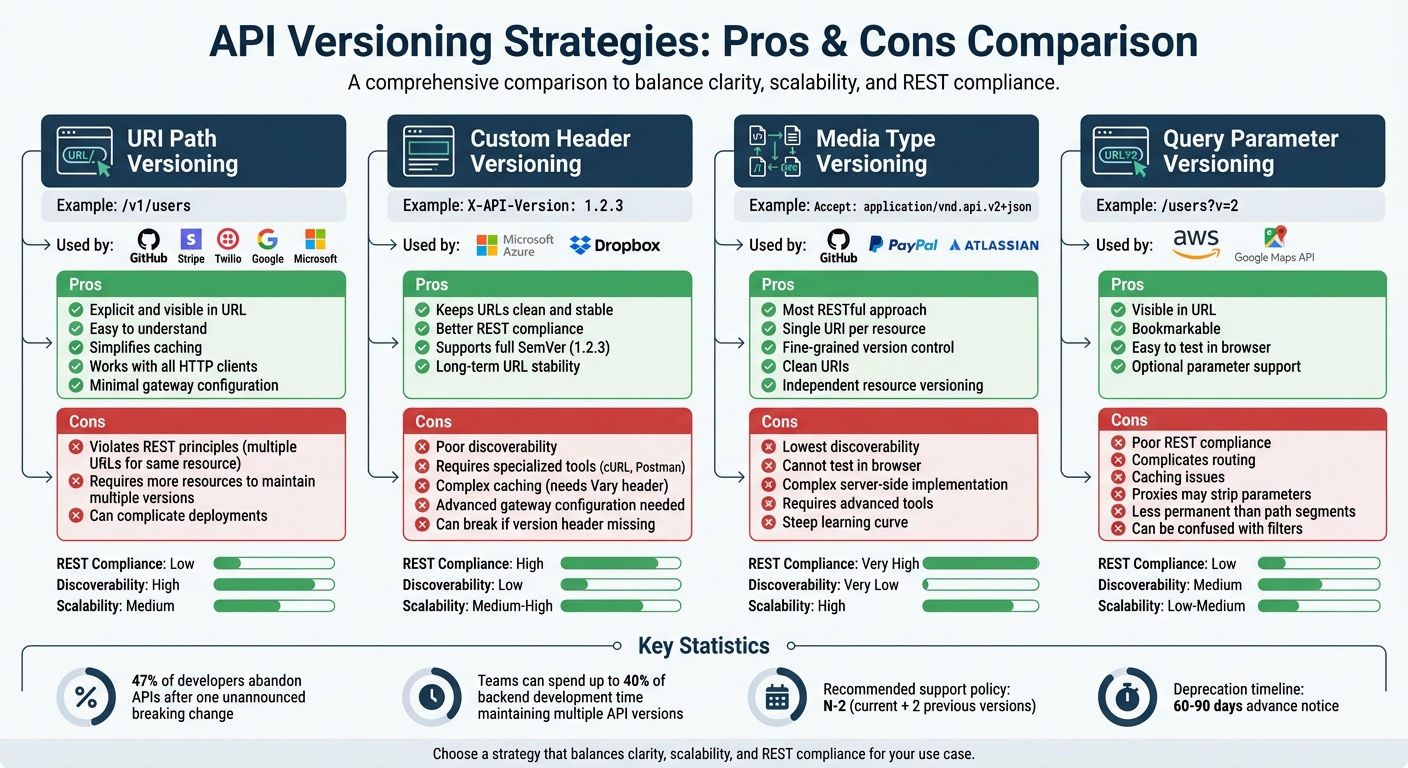
API Versioning Strategies Comparison: URI Path, Custom Header, Media Type, and Query Parameter Methods
When designing APIs, the trade-offs of each versioning method play a big role in shaping the design and maintenance process. Let's break down the pros and cons of the most common approaches.
URI path versioning is straightforward because the version is embedded directly in the URL. This makes it easy to understand and ensures unique URLs for each version, simplifying caching and requiring minimal configuration at the gateway. However, critics argue that it can clash with REST principles, as it assigns multiple identities to the same resource based on its representations. Despite this, its simplicity and compatibility with all HTTP clients make it a popular starting point.
Custom header versioning keeps URLs consistent, which aligns better with REST principles. However, it demands more advanced gateway configurations and careful use of the Vary header for caching. Developers appreciate the long-term stability of this method, as Neo Kim and Irina Dominte point out:
"Header-based versioning may look hard at first, but it's the cleanest long-term choice. Your URLs stay stable, while versions are handled in headers".
Media type versioning refines versioning by leveraging content negotiation, which adheres closely to REST principles. However, it has drawbacks: it's challenging to test in browsers and less discoverable for developers unfamiliar with the API's specifics.
Query parameter versioning strikes a middle ground. It offers decent visibility by including the version in the URL query string, but it can complicate routing and caching. Additionally, some proxies may strip query strings, potentially leading to incorrect version handling.
One crucial factor to consider is the ongoing maintenance burden. As ScaledByDesign aptly notes:
"API versioning is one of those decisions that feels simple when you make it and becomes a permanent tax on your engineering team".
For many teams, URI path versioning is often the most practical starting point. It’s explicit, easy to implement, and works well with an N-2 support policy (supporting the current version and the two previous ones), which helps manage maintenance more effectively.
At Antler Digital (https://antler.digital), our experience in building scalable applications highlights the importance of choosing a versioning strategy that matches your team's resources and your users' needs. A well-thought-out approach ensures smoother operations and better long-term scalability.
Conclusion
Semantic Versioning brings structure and clarity to API versioning, transforming it into a scalable contract that grows with your organisation. By adopting the MAJOR.MINOR.PATCH structure, you provide API consumers with clear expectations - whether they need to prepare for a breaking change or can seamlessly adopt a bug fix without manual intervention.
Without proper versioning, teams can find themselves spending up to 40% of backend development time maintaining backward compatibility across multiple active versions. Semantic Versioning helps tackle this by decoupling release cycles from consumer upgrades. This allows teams to focus on innovation through MINOR updates, while reserving MAJOR changes for essential, breaking updates.
These strategies lead to tangible efficiency improvements. Start with version 1.0.0 to signify stability, consider adopting a support policy like N-2, and integrate tools such as openapi-diff into your CI/CD workflow to detect breaking changes early. Additionally, include Deprecation and Sunset headers in API responses, giving consumers machine-readable warnings - ideally 60 to 90 days in advance for widely-used APIs - to ensure smoother transitions.
A consistent Semantic Versioning approach not only simplifies version management but also supports scalable API design. Whether you opt for URI path versioning (e.g., /v1/), headers, or media types, the key is maintaining consistency in your SemVer implementation. Many APIs expose only the MAJOR version in URLs, while internally tracking the full version details. Wherever possible, aim for non-breaking, additive updates to reduce the burden of maintaining multiple versions.
At Antler Digital (https://antler.digital), we've witnessed how a thoughtful versioning strategy - paired with clear documentation and automated contract testing - empowers teams to deliver features faster while maintaining trust with API consumers. Versioning should never be treated as an afterthought; it’s a fundamental design decision that directly impacts your API’s long-term scalability.
FAQs
When should I bump MAJOR vs MINOR vs PATCH in an API?
When making updates, increase the MAJOR version for changes that break compatibility with previous versions. Use the MINOR version when introducing new features that remain compatible with earlier versions. Update the PATCH version for bug fixes or small adjustments that don't affect compatibility. This approach helps maintain clear versioning and ensures users understand the compatibility of updates.
What is the best versioning method for public APIs?
URL path versioning is widely regarded as one of the most effective methods for managing public APIs. It’s straightforward, reliable, and simplifies the way developers handle updates. By embedding the version directly into the URL, this approach ensures compatibility between different versions of the API.
This method also makes routing and monitoring more manageable. Since the version is clearly stated in the URL, it becomes easier to track and manage changes across versions without confusion. For developers, this clarity can significantly reduce the risk of errors when integrating or updating APIs.
How do I deprecate an API version without breaking clients?
To phase out an API version without causing issues for users, it's important to follow a clear and organised approach. Start by announcing the deprecation well in advance - typically anywhere from 3 to 8 months. Clearly outline the timeline and provide users with migration guides to ease the transition.
During this period, ensure backward compatibility by supporting both the old and new API versions. Gradual deprecation methods, such as versioning through URI paths or headers, can help manage the process effectively. Additionally, offer detailed documentation to assist users in adapting to the changes, helping to minimise any potential disruptions.
if (valuable) then share();