Horizontal vs Vertical Scaling: Key Differences
Guide to scaling up vs out: trade-offs, when to choose vertical or horizontal scaling and a five-point decision checklist.

If I need a fast answer, it’s this: vertical scaling means making one server bigger, while horizontal scaling means adding more servers. One is simpler but capped by one machine. The other gives better uptime and more room for growth, but it takes more setup.
If I strip the choice down to what matters most, I look at five things:
- Bottleneck: CPU, RAM, disk, or database queries
- Traffic pattern: steady demand or sharp spikes
- Downtime tolerance: can one server failure take the service offline?
- State: are sessions, files, and cache tied to one machine?
- Team time: can we support a multi-server setup?
A few facts from the article stand out:
- One server has a hard limit, no matter how much CPU or RAM I add
- Horizontal setups cut single-server failure risk
- Databases often become the next bottleneck after scaling app servers out
- Large database changes can take time - one case in the article cites nine months to ship a first sharded table
- Auto-scaling can add or remove instances based on live load, such as CPU usage or request volume
For most teams, the simple rule is clear:
- Start with vertical scaling if workloads are predictable and the setup is still small
- Move to horizontal scaling when uptime matters more, traffic jumps around, or one box is no longer enough
- Use both when it fits: scale app servers out, and keep databases on one stronger machine until that stops working
Quick Comparison
| Factor | Vertical scaling | Horizontal scaling |
|---|---|---|
| How it grows | Add CPU, RAM, or storage to one server | Add more servers |
| Setup changes | Usually low | Often high |
| Failure risk | One machine can take everything down | Other nodes can keep serving traffic |
| Best fit | Small systems, steady traffic, early growth | Spiky traffic, high uptime needs, stateless apps |
| Main limit | Hardware ceiling | More moving parts and more coordination |
| Common pain point | Cost of bigger machines | Load balancing, shared state, database strain |
My take: I’d choose the simplest option that fixes the current bottleneck without boxing the team in later. That means scaling up first in many cases, but not ignoring the app design work needed if scaling out is likely next.
sbb-itb-1051aa0
Horizontal scaling: adding more servers to spread the load
Horizontal scaling, or scaling out, means adding more servers or instances so traffic is shared across them instead of hitting one machine.
How horizontal scaling works in practice
In day-to-day use, a load balancer sends requests across multiple instances and stops routing traffic to any that are unhealthy. That way, no single instance has to carry the whole load. If one instance goes down, the others keep serving requests.
For this setup to work well, app instances should stay stateless. In plain English, they shouldn't store state on the local machine. Sessions, files, and cache data need to live in shared services instead.
Once you scale out app servers, the database usually feels the strain next. More app instances often means more database connections and more queries hitting shared systems. That's why connection pooling and fleet-wide monitoring matter so much. Horizontal scaling can make the app layer more resilient, but it often pushes the bottleneck downstream, especially to shared databases. So while uptime gets better, pressure moves to coordination, databases, and observability.
Key benefits and trade-offs
The big upside is resilience and smoother traffic growth. When multiple instances run in parallel, you remove a single point of failure. You can also roll out updates as rolling releases, replacing instances one at a time, with zero downtime.
Capacity grows as you add instances, but cost and coordination still put a ceiling on things. Many cloud platforms can increase or reduce instance counts automatically based on live metrics such as CPU usage or request volume.
At larger scale, compute may cost less than pushing one machine higher and higher. But the system also gets harder to run. Orchestration, observability, and distributed services add operational cost. That's the trade-off: a more complex setup that makes sense when the workload is big enough to need it.
Vertical scaling: increasing the power of a single server
Vertical scaling, or scaling up, means adding more CPU, RAM, storage, or bandwidth to one server. The application stays on a single machine, which keeps things simple from an ops point of view. That’s why it often makes sense as an early scaling move for smaller systems.
Where vertical scaling fits best
Scaling up tends to work well for early-stage products and relational databases. Those systems often handle vertical growth more neatly than horizontal growth. PostgreSQL and MySQL are good examples: both can benefit from extra resources on a single instance before sharding enters the picture.
Figma followed that path. The team pushed a core Postgres instance as far as they could, and only then shipped their first horizontally sharded table after nine months of engineering effort. At some point, though, the trade-off changes. Once the workload no longer fits comfortably on one machine, the upside starts to fade.
Key benefits and limits
The big draw of vertical scaling is simplicity. You have fewer moving parts, simpler deployments, and one set of runbooks to maintain. In cloud setups, resizing a server can often be done in seconds, though there may still be a short downtime window.
That said, the limits show up fast enough:
- A single server still hits a hard hardware ceiling.
- Bigger instances can get expensive very quickly.
- You still have a single point of failure if that machine goes down.
Those limits are usually what push teams from scaling up to scaling out.
Key differences and when to use each approach
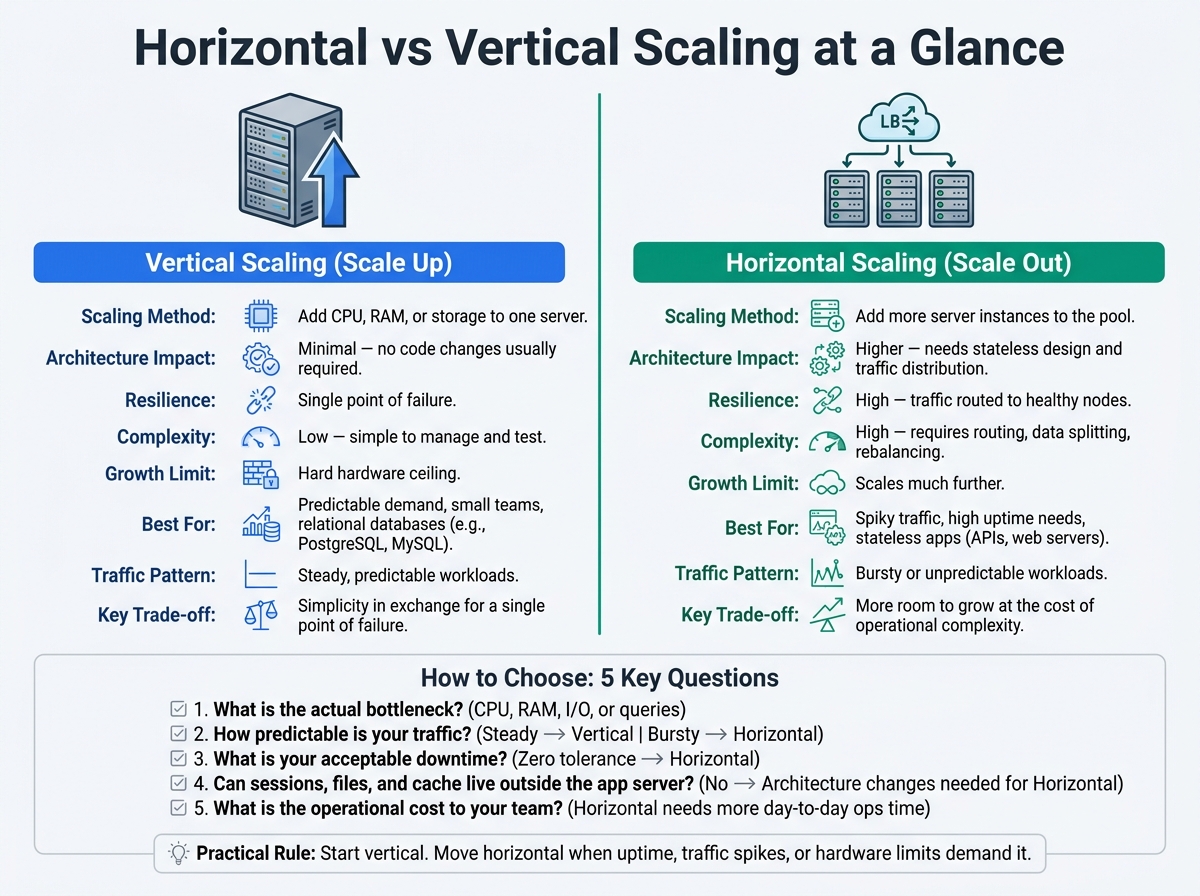
Horizontal vs Vertical Scaling: Side-by-Side Comparison
Those limits make the choice much easier. Here’s how the two approaches stack up side by side.
Comparison table: horizontal vs vertical scaling
| Factor | Vertical Scaling (Scale Up) | Horizontal Scaling (Scale Out) |
|---|---|---|
| Scaling method | Increase CPU, RAM, or storage on one server | Add more server instances to the pool |
| Architecture impact | Minimal; no code changes usually required | Higher; needs stateless design and traffic distribution |
| Resilience | Single point of failure; system goes down if the server fails | High; traffic can be routed to healthy nodes |
| Complexity | Low; simple to manage and test | High; requires routing traffic, splitting data, and rebalancing load |
| Growth limits | Hard hardware ceiling | Scales much further |
| Predictable demand | Cost-effective and simple | Can be over-engineered for steady loads |
| Traffic spikes | Limited by the peak capacity of the box | Excellent; supports elastic auto-scaling |
When to choose vertical scaling
Vertical scaling works well for predictable workloads, small teams, and systems that need a fast upgrade path with few changes. If you want more power without reworking your setup, scaling up is often the simplest move.
It also fits relational databases well. A well-tuned single instance can handle a surprising amount of traffic while keeping transactional behaviour simpler.
The trade-off is straightforward: you accept a single point of failure in exchange for simplicity. Early on, that can be a sensible call, especially if some downtime is acceptable and the team needs to stay focused on the product.
When to choose horizontal scaling
Horizontal scaling makes more sense when downtime isn’t acceptable, traffic is hard to predict, or the system needs to keep running even if one server fails. It usually takes more engineering work than scaling up, but you get much more room to grow.
It’s also the natural fit for stateless application layers, such as web servers, APIs, and background workers. These can be spun up or shut down without affecting shared state. In practice, many systems use a hybrid model: scale stateless services out, and keep stateful systems scaled up until they hit their limit.
The next step is to match that setup to your traffic pattern, data model, and team capacity.
Choosing the right scaling strategy for your system
Once the trade-offs are clear, the next step is simple: pick the option that matches your workload right now. The best choice usually comes down to five things: your bottleneck, traffic pattern, downtime tolerance, state model, and the time your team can spare.
A practical selection framework for SMEs and product teams
Use these five checks so you don't choose based on habit instead of evidence:
- What's the actual bottleneck? Check whether the problem is CPU, RAM, I/O, or queries before adding hardware.
- How predictable is your traffic? Steady, predictable business-hours workloads tend to suit vertical scaling well. Bursty or less predictable traffic is where horizontal scaling tends to fit better.
- What's your acceptable downtime? If downtime isn't acceptable, horizontal scaling is usually the better fit.
- Can your sessions, files, and cache live outside the app server? If not, horizontal scaling will need architecture changes before it can work.
- What's the operational cost to your team? Horizontal scaling usually needs more day-to-day ops time than vertical scaling.
Use those answers to pick the simpler option that matches your current constraints.
Conclusion: choose based on fit, not theory
Start with vertical scaling for simple, predictable loads. Move to horizontal scaling when traffic gets bursty, uptime matters, or one server can no longer handle the workload.
FAQs
Which scaling option should I start with?
Start with vertical scaling. It’s the simplest route. You increase the capacity of your current machine, such as CPU or memory, without changing the architecture or dealing with the overhead of distributed systems. That makes it the fastest and most cost-effective choice for early-stage applications.
As your application grows, Antler Digital recommends a hybrid approach: keep vertical scaling for stateful services like your primary database until you hit hardware limits, and use horizontal scaling for stateless application layers.
When does horizontal scaling become worth the complexity?
Horizontal scaling is worth the extra moving parts when one machine just can’t keep up anymore, even after you’ve tuned queries, added the right indexes, and squeezed as much as you can out of caching. It also makes sense when the biggest instance you can buy still falls short.
It matters for high availability too. A single vertically scaled instance is still a single point of failure. And for stateless applications with traffic that goes up and down, horizontal scaling can be a smart way to auto-scale without spending more than you need to.
How do I know if my database is the bottleneck?
Monitor the numbers that matter. In most cases, a database needs scaling when average query times go past 200 ms or CPU usage stays above 70% for a sustained period.
Before you scale, fix the obvious pressure points.
Start with:
- missing indexes on your top 10 slow queries
- Redis caching for read-heavy data
- N+1 query patterns that trigger too many database calls
If performance still doesn’t improve after that, the database is probably the main bottleneck. At that point, it makes sense to look at vertical scaling or adding read replicas.
if (valuable) then share();