Dynamic Workflow Orchestration: Performance Tips
Techniques to cut latency, enforce idempotency, manage retries, map tasks dynamically and scale reliable AI-driven workflows.

Dynamic workflow orchestration is about managing workflows in real-time using AI to optimise task execution, reduce latency, and handle variable workloads. Unlike static systems, dynamic workflows adapt based on outcomes, ensuring efficient resource allocation and error recovery. These systems are vital as user-facing applications demand faster response times and scalable solutions.
Key takeaways:
- Latency Reduction: Techniques like Eager Workflow Start and persistent connections can cut inter-step latency to under 5ms.
- Idempotency: Ensures operations yield consistent results across retries, preventing errors like duplicate charges.
- Dynamic Task Mapping: Adjusts tasks based on real-time data to handle unpredictable workloads efficiently.
- Retry Policies: Use exponential backoff with jitter to prevent system overload during failures.
- Parallel Processing: Speeds up execution but requires careful management to avoid resource exhaustion.
- Monitoring: Observability tools track latency, errors, and resource metrics to maintain system reliability.
- Modular Design: Breaks workflows into smaller components for easier updates and maintenance.
With AI-driven systems becoming more prevalent, mastering these techniques is essential for creating fast, reliable, and scalable workflows.
Designing Idempotent Tasks
Idempotency refers to the ability of an operation to produce the same outcome regardless of how many times it is executed. In distributed systems, where network failures and timeouts are unavoidable, this property becomes critical. Without idempotency, retries could lead to duplicate side effects - like charging a customer twice or creating redundant records. When a confirmation is lost, idempotency ensures retries are safe. As ReliabilityLayer explains:
Idempotency means: running the same operation multiple times produces the same final business result as running it once.
For AI-driven workflows, where agents manage multiple tools and deal with probabilistic responses, idempotency acts as a safeguard. It creates predictable boundaries, preventing errors from multiplying during retries or branching. Most orchestration engines guarantee at-least-once task delivery, meaning tasks may be processed more than once due to worker restarts or timeouts. This makes designing for idempotency essential, not optional.
How to Implement Idempotent Operations
To implement idempotency effectively, use unique and stable keys derived from input variables. Avoid random UUIDs, as they can disrupt consistency during retries. For instance, you could use a deterministic stepId or a combination of workflowId and taskId as the idempotency key when interacting with third-party APIs.
Incorporate a check-before-write approach. This involves querying the current state before performing a mutation. If the record already exists, perform a no-op or update it instead of creating a duplicate. Database upsert operations, such as INSERT ... ON CONFLICT UPDATE, can help manage repeated writes efficiently. For downstream API calls, favour PUT or DELETE methods over POST, as these are inherently idempotent.
For AI agents, hash the action name with key input fields to detect semantic duplicates. Design workers to interpret a 409 (Conflict) HTTP response as a success if the operation was already executed. In production, store idempotency keys in durable systems like Redis or key-value stores. Use a Time-to-Live (TTL) of 24–72 hours to prevent excessive storage growth.
These protocols not only ensure consistency but also help streamline recovery when failures occur.
Reducing Latency During Failures
Idempotency doesn't just ensure consistency - it also speeds up recovery during failures. With idempotent tasks, workflows can resume from a known state without requiring manual intervention or complex data clean-up. This allows the system to retry failed tasks immediately and safely, improving overall performance.
However, challenges like the "check-then-act" pattern can arise. This pattern might fail if concurrent processes read the same flag before the first write is completed. Immediate retries during outages can also strain dependencies, potentially triggering rate limits or synchronised reconnect storms. To counter this, adopt exponential backoff with jitter, using a formula like [0, base * 2^attempt]. This prevents "thundering herd" effects and reduces pressure on downstream services.
Classifying errors is another effective strategy. Instead of handling all errors the same way, categorise them as transient (retryable), permanent (requiring a halt), or ambiguous (worth a single retry). As Antigravity Lab insightfully puts it:
The question we need to answer before every retry is not 'can we call this again?' but 'is there a cheap way to know this action has already been done?'.
sbb-itb-1051aa0
Optimising Task Mapping for Variable Workloads
Dynamic task mapping is all about creating tasks during runtime based on actual, real-time data. This method is especially useful for handling unpredictable workloads, such as cloud file uploads or fluctuating API requests. Instead of relying on pre-defined task structures, this approach lets workflows adapt dynamically. By doing so, it builds on earlier techniques for reducing latency, ensuring resources are used efficiently in real time.
However, there’s a catch - dynamic tasks can sometimes overload infrastructure. For instance, Apache Airflow has a default limit of 1,024 mapped task instances per expansion to maintain system stability.
Adapting to Changing Workloads
Industries like FinTech and SaaS often face unpredictable spikes in demand. For example, a payment processing system might handle 100 transactions one hour and 10,000 the next. Dynamic task mapping adjusts the number of task instances to meet these shifting demands.
That said, task granularity plays a crucial role. For extremely short tasks (those taking less than a second), the overhead from orchestration - such as logging, state tracking, and database writes - can actually outweigh the task’s execution time. The answer? Batching. By grouping smaller operations into a single task that runs for a few seconds, you can maintain throughput while easing the metadata load on the orchestrator.
For short, idempotent tasks, another option is using local activities. These run within the same process as the workflow, eliminating the need for network round-trips to the orchestration server. This can save over 50 milliseconds per activity. Combine this with early return patterns, and you could see workflow response times drop by up to 91%.
Practical Task Mapping Strategies
Dynamic task mapping thrives on solid idempotency and failure recovery mechanisms, ensuring systems remain stable even under fluctuating workloads. With idempotent operations ensuring consistent state recovery, dynamic task mapping takes the next step by scaling and adapting to demand effectively.
Start by using conditional task generation. Filter functions can return None or raise skip exceptions during the mapping phase to avoid creating unnecessary tasks, keeping your task graph streamlined.
For large datasets, consider using proxy objects for lazy evaluation. This defers data retrieval and helps avoid memory exhaustion.
When multiple parallel tasks try to update the same downstream dependency simultaneously, race conditions can become a problem. To handle this, use optimistic locking with version-based concurrency control in your database. This allows concurrent execution without blocking.
Another tip: store large task inputs and outputs in external storage solutions like Amazon S3. Pass references between tasks instead of the actual data to reduce memory pressure on the orchestrator.
A great example of dynamic task mapping in action comes from June 2024, when an AWS-based financial research AI agent used Amazon Bedrock and a dynamic orchestration engine to handle specialised sub-agents. When given a natural language query like "analyse AMZN", the system dynamically created a workflow with seven parallel data-gathering tasks. Thanks to tools like DynamoDB Streams and Lambda, the analysis time dropped from 8 minutes 50 seconds to just 3 minutes 6 seconds - a 65% improvement compared to running the tasks sequentially.
Retry and Timeout Policies
When a task fails within a dynamic workflow, the system has to make a crucial choice: retry the task, delay the attempt, or abandon it altogether. Mismanaged retries can escalate minor network issues into full-blown outages, while overly cautious timeouts can leave workflows stuck for extended periods. The challenge lies in crafting policies that can tell the difference between temporary glitches and permanent errors.
To start, categorise errors into three types: transient (e.g., network timeouts, 429 rate limits), permanent (e.g., 401 authentication errors, invalid input), and ambiguous (e.g., 500 server errors). Retries should be reserved for transient and ambiguous errors, while permanent ones like 404 or validation errors should not be retried.
A good retry policy also relies on a unique key - such as a hash of the action name and its input - to ensure that repeated operations have consistent outcomes. Without this safeguard, retries could lead to duplicate actions, such as multiple charges, repeated emails, or inconsistent database updates. This approach naturally integrates with backoff strategies to maintain system stability.
Implementing Exponential Backoff
Fixed retry intervals can create constant load on failing services, making it harder for them to recover. Exponential backoff, which doubles the wait time after each failed attempt (e.g., 1 second, 2 seconds, 4 seconds, 8 seconds), offers a better alternative by giving the system time to recover. However, simultaneous retries from multiple workers can create a "thundering herd" effect, overwhelming the service just as it begins to recover.
To address this, full jitter introduces randomness into the retry timing. Instead of waiting exactly 8 seconds, for example, the system selects a random interval between 0 and 8 seconds. This spreads out reconnection attempts, easing the pressure on the recovering system. As Sujeet Jaiswal, Principal Software Engineer, explains:
Naive retries do not just fail to help - they actively cause the outages they are trying to recover from.
It’s also important to cap the maximum delay, typically between 30 and 60 seconds. This ensures retries remain frequent enough to catch recovery windows but don’t stretch into unreasonably long intervals.
For workflows driven by AI, it’s wise to monitor cumulative API usage across retries using token budgets. If the retry loop exceeds a pre-set cost limit, abort it to avoid unexpected expenses. Soft alerts at 80% of the retry budget can give teams time to intervene before hitting the ceiling. Once retries are under control, setting precise timeouts ensures workflows run predictably.
Setting Optimal Timeout Durations
In dynamic orchestration, timing is crucial, and well-defined timeouts play a key role. Timeouts serve two main purposes: detecting unresponsive workers and enforcing overall execution limits. For example, a 30-second heartbeat timeout can quickly identify when a worker has gone silent. Meanwhile, a much longer total execution timeout (e.g., 1 hour) allows ample time for the task to complete. For lengthy operations, workers should send periodic "in-progress" updates to extend their lease, preventing premature task termination.
A hard total timeout should also account for all retry attempts. OpenWorkflow, for instance, caps workflows at 1,000 total step attempts to prevent endless retries, ensuring tasks fail predictably within a manageable timeframe.
For webhook deliveries, a retry schedule of five attempts over 10 hours (e.g., 30 seconds, 5 minutes, 30 minutes, 2 hours, and 8 hours) strikes a balance between persistence and resource efficiency. Always respect Retry-After headers and apply jitter to avoid synchronised retries. In production, it’s normal to see a 2–5% failure rate for webhook deliveries.
Parallel Processing and Caching
Once robust retry and timeout controls are in place, the next step is to focus on speeding up task execution through parallel processing and caching. Parallel execution can dramatically reduce total runtime. For example, five tasks that each take 3 seconds to complete can run simultaneously in just 3 seconds, rather than the 15 seconds they would require if executed one after the other.
However, achieving this requires careful management. Overloading the system with hundreds of concurrent tasks can deplete memory or trigger rate limits on external APIs. Similarly, caching must be carefully configured to ensure that outdated data doesn’t compromise accuracy, while still delivering performance improvements.
Implementing Dynamic Parallelism
The Scatter-Gather pattern is a popular approach for parallel workflows. During the "Scatter" phase, multiple independent sub-tasks are initiated, and the "Gather" phase collects all results before moving forward. Many orchestration tools support dynamic task generation, allowing workflows to adjust to changing workloads on the fly. For example, in a Dagster pipeline handling 26 items, built-in dynamic outputs took about 26 seconds due to overhead, while Python-native multiprocessing reduced this to just 4 seconds.
To prevent overloading downstream services or breaching rate limits, always set a concurrency_limit. Asynchronous calls, such as Python’s asyncio.gather() or JavaScript’s Promise.all, are particularly effective for eliminating sequential bottlenecks in workflows.
Andrew Dugan, Senior AI Technical Content Creator II at DigitalOcean, highlights the importance of asynchronous methods:
Using asynchronous calls to small, fast models can help you create effective, low-latency agentic workflows for time-sensitive applications.
In high-concurrency environments, avoid using in-memory variables to track task completion, as this can lead to race conditions. Instead, rely on atomic data stores like Redis with INCR operations to ensure safe concurrency. This approach is critical for maintaining reliability in dynamic workflows and ties back to earlier discussions on idempotence and error handling. Ami Dias from WeblineGlobal shares:
Transitioning from a fragile collector pattern to an atomic, state-driven architecture allowed our client to scale their document processing from tens to thousands of simultaneous pages without 'zombie' workflows.
For handling partial failures, tools like Promise.allSettled or try/except blocks ensure that completed tasks return cached results immediately, while only the failed ones are re-executed. These strategies lay the groundwork for effective caching, which further enhances workflow efficiency.
Using Caching to Reduce Redundancy
Caching helps eliminate repetitive processing by storing results for specific inputs. If the same task is called again with identical data, the system retrieves the cached result instead of re-executing the function. In distributed systems or cloud environments, external storage solutions like Amazon S3 can be used to share cached results across multiple execution nodes.
To prevent cached data from becoming stale, set expiry times using time-based logic, such as timedelta. When defining cache policies, exclude non-essential metadata like "debug" or "logging" flags from the cache key to avoid unnecessary re-computation. Effective caching is particularly crucial in high-concurrency scenarios, such as document processing workflows where a single document might trigger 50 to 200 independent tasks.
All cached tasks should be idempotent - meaning they produce the same result when executed multiple times with the same input. This ensures retries are safe and predictable. Additionally, instead of passing large results (e.g., extensive LLM-generated text) through webhooks, store them in a database and use a job_id to reference the data in subsequent workflow stages. During development, caching can be disabled by setting PREFECT_TASKS_REFRESH_CACHE=true.
Finally, combine caching with strict timeouts and AbortController logic for external API calls to prevent a single slow task from delaying the entire parallel workflow. Prefect 3.0, released in 2024, has demonstrated how modern orchestration tools can optimise both caching and execution speed, reducing runtime overhead by up to 90%.
Performance Monitoring and Observability
After optimising parallel processing and caching, the next step is implementing thorough monitoring to identify and resolve bottlenecks. Without proper visibility, even well-constructed workflows can fail silently or experience gradual degradation, often going unnoticed until users raise complaints.
Effective monitoring depends on collecting and analysing logs, metrics, traces, and events. However, traditional monitoring methods often fall short when applied to dynamic workflows, especially those involving AI models. A November 2025 McKinsey report revealed that only 39% of organisations experienced a positive EBIT impact from AI projects, with reliability and monitoring issues being a major factor. Alarmingly, a 2025 survey of over 2,000 n8n workflows showed that 67% of AI workflows lacked cost tracking despite using paid LLM APIs, and 34.7% were missing proper error handling.
Dileepa Wijayanayake from FlowWright highlights the difference between basic monitoring and deeper observability:
Workflow observability goes beyond simple monitoring. It's about gaining a deep, comprehensive understanding of how your workflows function in real-time.
Modern observability tools focus on traditional metrics alongside AI-specific data like model versions, prompt-response pairs, token usage, and LLM inference latency. For workflows with variable workloads, tracking "schedule-to-start" latency is critical. A P95 latency exceeding one second often signals insufficient worker capacity or misconfigured task slots. Temporal Cloud, for instance, achieves an end-to-end latency of about 100 milliseconds, which can become a limiting factor for workflows aiming for a 500-millisecond total latency budget.
Setting Up Monitoring Frameworks
Building a strong monitoring framework involves five key elements: visibility, instrumentation, analytics, optimisation, and AI-driven predictive analysis. Start by monitoring core metrics like execution IDs, timestamps, trigger sources, status, and duration.
For distributed workflows, OpenTelemetry is invaluable for connecting multi-step processes into a unified view, helping pinpoint bottlenecks such as slow API calls or database queries. The introduction of OpenTelemetry GenAI Semantic Conventions in December 2025 aims to standardise the collection of LLM metadata and traces, making it easier to compare performance across different models and providers.
Keep a close eye on resource and capacity metrics, such as worker CPU/memory usage and task slot availability, to avoid task queue backlogs. Monitoring cache hit ratios can also help determine whether worker memory is adequate for current workflow demands. Additionally, metrics like temporal_request_failure_total can serve as early warnings for rate limiting or resource exhaustion, signalling potential system saturation. These measures complement earlier latency reduction strategies, ensuring workflows run smoothly from start to finish.
To prevent cascading failures, implement circuit breakers that halt execution temporarily if a task or AI model fails repeatedly (e.g., five consecutive failures). Route critical errors, such as payment failures, to high-priority channels like PagerDuty, while directing less urgent issues to platforms like Slack. Danny Lev, Founder & CEO of Evaligo, offers practical advice:
The goal isn't perfect monitoring - it's sufficient visibility to detect, diagnose, and resolve issues quickly.
Using AI for Predictive Analysis
Once a monitoring framework is in place, AI can shift the focus from reactive troubleshooting to proactive management. Predictive analytics uses workflow data to anticipate potential problems before they escalate. Metrics like P95 latency (schedule_to_start_latency) enable AI to predict when worker capacity may fall short of workload demands. Similarly, metrics such as temporal_worker_task_slots_available allow for early identification of resource depletion, preventing system failures. AI can also flag "zombie activities" - tasks that have timed out but continue to occupy resources - by analysing heartbeat and timeout patterns.
For short, idempotent tasks, local activities can bypass the latency of round trips to the orchestration server, saving 50 milliseconds or more per activity. Combining checkpointing with persistent connections can further reduce inter-step latency to under 5 milliseconds, compared to the 50–250 milliseconds typical of standard HTTP-based dispatch models.
Logs should be summarised and aggregated with context, enabling both human operators and AI systems to diagnose issues across distributed environments. Centralising this data allows machine learning models to identify patterns that might be missed when examining services individually. By forecasting bottlenecks and managing resources proactively, AI-driven insights strengthen the dynamic adjustments discussed earlier. As workflows grow more complex and integrate multiple AI models, predictive analysis becomes essential to maintaining stable and reliable production systems.
Modular Workflow Components
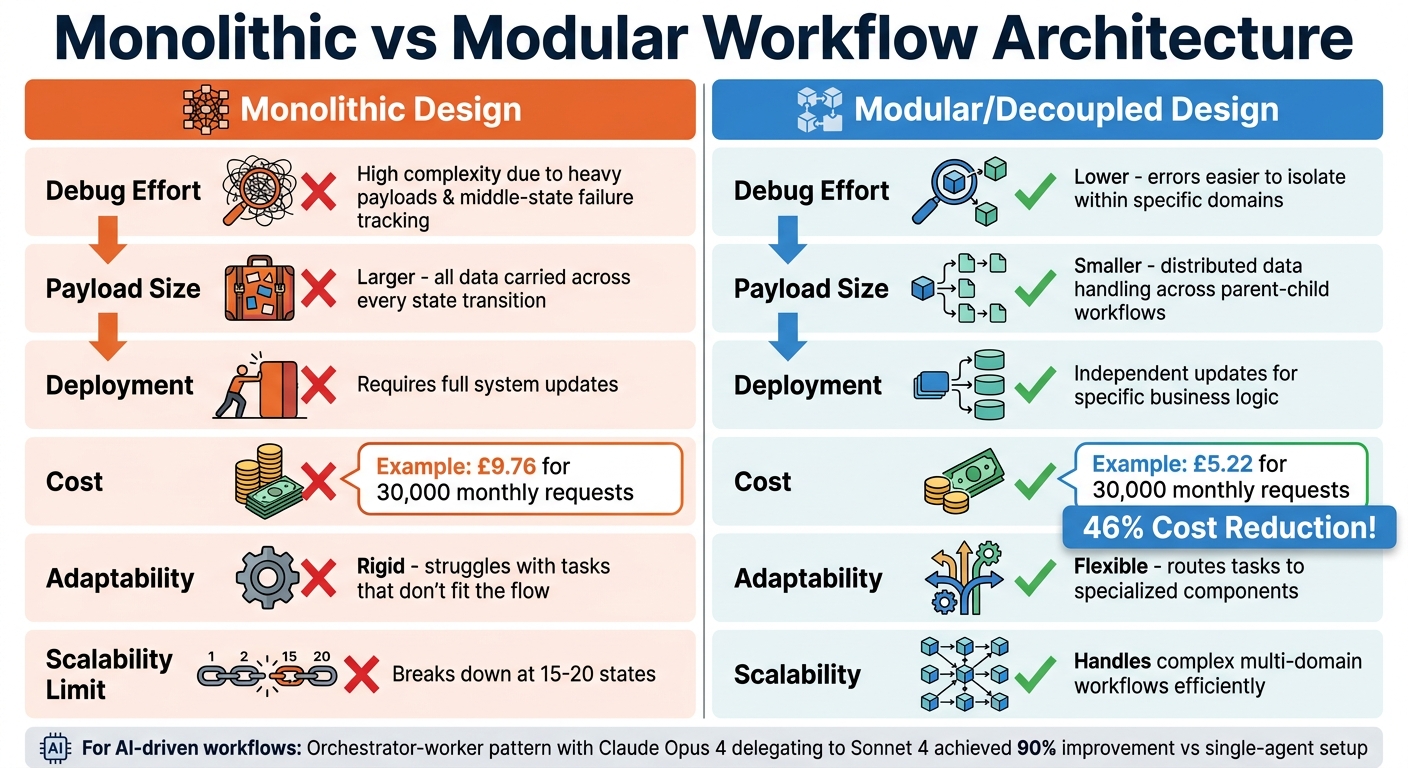
Monolithic vs Modular Workflow Architecture Comparison
Creating dynamic workflows that are scalable and easy to debug often comes down to using modular components. Once workflows are monitored, structuring them for better maintenance and scalability becomes crucial. A modular design approach breaks down complex workflows into smaller, self-contained pieces. These components can be developed, tested, and deployed independently, helping to avoid "state explosion" - a situation where changes in one part of the workflow ripple through the entire system. This approach not only reduces the likelihood of system-wide failures but also makes performance issues easier to pinpoint.
LittleHorse captures the advantage of this method perfectly:
The choice isn't just between a tangled monolith and a sprawling microservice architecture. By adopting a modular monolith and orchestrating its workflows, you gain the operational simplicity of a single deployment alongside the resilience, visibility, and scalability of distributed systems.
Monolithic workflows start to show cracks when they exceed 15–20 states or span multiple business domains. For instance, a 2026 AWS Step Functions study comparing 30,000 monthly requests showed that a decoupled architecture cost about £5.22, whereas a monolithic approach came in at £9.76 - a cost reduction of 46%. Beyond saving money, modular workflows also lower deployment risks and reduce downtime.
Modular vs Monolithic Designs
The differences between modular and monolithic workflows aren't just technical - they affect debugging, scalability, and long-term upkeep. Monolithic designs carry all data through every state transition, resulting in larger payloads and making it harder to trace errors in intermediate states. Modular workflows, on the other hand, distribute data handling across parent and child structures, which keeps payloads smaller and simplifies error tracking.
| Feature | Monolithic Design | Modular/Decoupled Design |
|---|---|---|
| Debug Effort | High; complex due to heavy payloads and middle-state failure tracking | Lower; errors are easier to isolate within specific domains |
| Payload Size | Larger; all data carried across every state transition | Smaller; data handling is distributed across parent-child workflows |
| Deployment | Requires full system updates | Allows independent updates for specific business logic or domains |
| Cost | Higher due to billable state transitions in large workflows | Lower; uses cheaper "Express" workflows for sub-tasks |
| Adaptability | Rigid; struggles with tasks that don't fit the flow | Flexible; can route tasks to specialised components as needed |
For AI-driven workflows, balancing orchestration overhead with performance gains is essential. Routing decisions in these workflows can add a 15–25% token overhead. However, in complex research tasks, using an orchestrator-worker pattern can yield significant benefits. For example, Claude Opus 4 delegating tasks to Sonnet 4 sub-agents achieved a 90% improvement compared to a single-agent setup.
Building Reusable Components
Reusable components play a key role in speeding up deployment and increasing system flexibility. By centralising commonly used operations, such as notifications, these modules simplify updates and reduce the risk of system-wide disruptions. To get started, identify bounded contexts like Inventory, Billing, or User Management, and create utility workflows for shared operations.
Real-world examples highlight the benefits of this approach. In December 2024, Bugcrowd transitioned from a legacy Ruby monolith to a microservices architecture with Temporal. This change boosted their engagement capacity by 400% and saved their engineering team 15 hours per week by cutting down on manual processes. Similarly, Swiggy, a food delivery platform, adopted Akka-powered micro-batching and feature reuse to improve their order-assignment AI. This reduced prediction latency by 50%, achieving response times of just 71 milliseconds at scale.
To ensure smooth integration of modular components, it’s important to enforce strict boundaries using language-specific tools like Java Modules or C# Projects. This prevents unauthorised dependencies between modules. Use parent-child patterns, where a "parent" workflow handles high-level business logic, while "child" workflows manage specific, short-term tasks. Express child workflows are particularly useful for cutting costs and speeding up execution. Lastly, make sure every reusable component is idempotent, so failures remain predictable and manageable.
Scalable Execution Engines
Once modular workflows are in place, the next step is ensuring the execution engine can adapt to varying workloads. A well-designed execution engine should automatically scale to meet demand - ramping up resources during traffic surges and scaling down during quieter periods. This elasticity is especially important for AI-driven workflows, where task complexity can fluctuate significantly. Such adaptability works hand-in-hand with earlier strategies like reducing latency and leveraging parallel processing.
Serverless architectures are particularly effective for automatic scaling without idle costs. For example, AWS Lambda, when used with DynamoDB, can instantly scale to handle thousands of concurrent tasks while charging only for active runtime. On the other hand, worker-based systems like Temporal or Kestra allow for independent scaling of worker pools, providing more granular control over resources. The choice between these approaches depends on your workload: serverless solutions are ideal for unpredictable, bursty traffic, while worker-based engines are better suited for steady, high-volume processing.
Backend limitations are a common challenge. For instance, standard setups using JDBC or Postgres can handle around 1,000 task runs per minute before latency becomes an issue. When workloads exceed 2,000 runs per minute, high-performance systems like Kafka may be required to maintain responsiveness. Monitoring schedule-to-start latency - the time tasks spend in a queue - is essential. If this metric rises while worker hosts are maxed out, it’s a clear signal to add more workers or increase concurrent slot limits.
Dynamic Resource Allocation
To maintain responsiveness, adaptive resource allocation is crucial. Using resource-based slot suppliers, you can adjust concurrency in real time based on CPU and memory usage. This approach helps prevent crashes during workload spikes. Temporal’s documentation highlights:
A higher rampThrottle trades off performance for safety.
For workloads that are predictable, fixed-size suppliers offer minimal overhead and consistent task completion times. However, for tasks with variable or unpredictable resource demands, resource-based auto-tuners are a more practical choice, delivering solid performance without requiring extensive profiling. Additionally, local activities, which run within the worker process, can cut round-trip overhead by over 50 milliseconds. When combined with techniques like the "early return" pattern, workflow response times can see reductions of up to 91%.
Agentic AI for Task Reprioritisation
After optimising resource allocation, AI can be introduced to dynamically adjust task priorities based on real-time conditions. While AI-driven workflows bring flexibility, they also introduce unique scaling challenges. For instance, dynamic orchestration allows agents to adapt execution paths as needed, but this comes with a cost: routing decisions alone can add a 15–25% token overhead. For simple, repetitive tasks, this overhead may not be worthwhile. However, for complex operations like research or data analysis, the orchestrator-worker model - where, for example, Claude Opus 4 delegates to Sonnet 4 - can improve efficiency by up to 90% compared to single-agent setups.
The trick lies in knowing when to use static versus dynamic orchestration. Start with static workflows and only implement AI-driven reprioritisation when metrics show the added flexibility offsets the cost. If routing accuracy drops below 90% or dynamic overhead exceeds 20% of total tokens, simplifying the architecture is often the best course of action. As Xgrid aptly states:
Agentic AI forces you to scale execution, not just models.
Workload isolation is another critical factor. Latency-sensitive tasks should be separated from resource-intensive background jobs by using distinct task queues. This ensures high-priority workflows are not delayed. Additionally, idempotency remains essential to avoid issues like duplicate charges or multiple email sends. For AI-generated execution plans, incorporating human oversight is vital to prevent unsupervised execution of complex workflows.
Finally, keep an eye on the worker_task_slots_available metric to ensure your worker pool isn’t saturated, and verify that the polling success rate stays above 0.95. These metrics act as early warning signs, allowing you to scale resources before performance begins to degrade.
Antler Digital's Workflow Optimisation Services
Once the technical strategies are in place, many SMEs realise they need expert help to truly implement and refine these improvements. That’s where Antler Digital steps in. Specialising in FinTech, SaaS, and digital branding, Antler Digital focuses on creating performance-optimised workflows. Their approach moves businesses from rule-based automation to agentic AI systems, which adapt messaging, spending, and targeting dynamically across digital platforms. They offer tailored services through flexible engagement models designed to meet the unique needs of SMEs.
Custom Solutions for SMEs
Antler Digital provides three distinct engagement models, each designed to align with the varying operational styles of SMEs:
- Project-Based Solutions: Ideal for tackling specific initiatives.
- In-House Team Integration: Embeds technical expertise directly into a company's team.
- Full-Service Technical Management: Covers everything from initial planning to ongoing maintenance.
This adaptability ensures businesses can adjust resources to match their project demands in real time.
To optimise workflows, Antler Digital employs advanced techniques such as serverless execution, global edge networks, and modular architecture. These methods minimise latency and simplify updates. By utilising platforms like Vercel and Next.js edge functions, they bring processing closer to users, implement caching, and streamline deployments with modular codebases.
For instance, when working with Wiserfunding - a fintech risk management platform - Antler Digital rebuilt their frontend using Next.js and React, hosted on Vercel. This upgrade leveraged a global edge network and optimised data flows, ensuring a smooth and responsive experience across devices. Jeremy, Wiserfunding's CTO, shared:
The team at Antler Digital transformed our requirements into a functional and user-friendly risk analysis application. They brilliantly handle the frontend of our fintech both with design and development.
This partnership has lasted over four years, with Antler Digital collaborating closely with penetration testers to maintain robust security standards.
Case Studies and Success Stories
Antler Digital has a proven track record of turning strategies into tangible results for their clients.
Take One Tribe, an environmental SaaS platform. They faced significant challenges with technical debt and scalability. Antler Digital stepped in to modernise their outdated Next.js framework, eliminate reliance on external Google Cloud functions, and introduce a staging environment for improved testing. They also implemented incremental static regeneration for brand pages, enabling real-time updates without compromising performance. The outcome? A more stable and scalable platform with faster load times and higher user conversion rates. This demonstrates how effective workflow optimisation can directly reduce latency and enhance efficiency in practice.
Conclusion
Streamlining workflow orchestration isn’t about tacking on isolated features - it’s about crafting a well-integrated system. The strategies outlined here work together seamlessly: designing idempotent tasks avoids duplicate side effects, dynamic mapping adjusts to fluctuating workloads, and smart retry policies with exponential backoff and jitter help keep costs under control. Pairing methods like Early Return with Local Activities significantly cuts down response times, turning slow, background processes into systems that feel swift and responsive.
To build on these system-wide techniques, parallelism and caching help eliminate unnecessary work, while modular components ensure workflows can scale and adapt as complexity increases. Observability frameworks provide early warnings for performance issues, and scalable execution engines with dynamic resource allocation ensure your system remains efficient, even under heavy demand. As Antigravity Lab aptly states:
Retry is not a feature you use, it is a system you design.
This idea resonates across all aspects of orchestration, from configuring timeouts to handling failures effectively.
FAQs
How do I choose a good idempotency key?
When designing a system that handles operations, it's crucial to use a unique and deterministic key to identify each specific operation. This ensures that repeated requests using the same key will always produce the same outcome, without causing unintended side effects.
A good key might combine identifiers like workflowId and taskId, or rely on static values such as transaction IDs. These combinations help maintain uniqueness and clarity. However, it’s important to scope these keys carefully to prevent conflicts between different workflows. For instance, a poorly scoped key could inadvertently overlap with another operation, leading to errors.
Consistency is equally important when dealing with retries. Using the same key for retries ensures that the system recognises the operation as a repeat and avoids creating duplicate side effects, like processing the same payment twice or sending duplicate notifications.
When should I use dynamic task mapping instead of batching?
When you need to create a varying number of tasks at runtime, depending on current data or changing conditions, dynamic task mapping is the way to go. This method allows workflows to adjust on the fly, enabling better flexibility and more efficient task distribution. It's especially useful in scenarios where scalability is a priority.
How do I set retries and timeouts without causing outages?
To manage retries and timeouts effectively without causing outages, it's essential to use configurable retry strategies and timeout policies. Incorporate exponential backoff with caps to prevent overwhelming the system during retries. For tasks, set timeouts carefully and use lease extensions to avoid cutting processes off too early.
Keep an eye on error rates and adjust settings dynamically to maintain system stability. Additionally, adopt patterns like circuit breakers to halt repeated failures and compensation workflows to handle errors gracefully. These practices help maintain resilience, especially during periods of high demand or temporary issues.
if (valuable) then share();