How AI Improves Client Onboarding Workflows
AI speeds client onboarding by automating data capture, document processing and scheduling, cutting errors and ensuring UK GDPR compliance.

AI transforms client onboarding by making it faster, more efficient, and accurate. Traditional methods often waste time, require repetitive tasks, and risk errors. AI tools streamline data collection, automate document processing, and reduce manual work, cutting onboarding times by up to 80%.
Key takeaways:
- Time savings: Onboarding reduced from weeks to days (e.g., 14–30 days to 3–4 days).
- Efficiency: Up to 5+ hours saved per client by automating tasks like data entry and scheduling.
- Accuracy: Document errors drop by 60–80% with AI validation.
- Retention: Personalised onboarding content increases client loyalty by 86%.
AI allows teams to focus on building relationships while handling admin tasks like form processing and scheduling. With compliance tools for UK GDPR and FCA regulations, businesses can ensure secure and reliable operations. By integrating AI into existing systems, UK firms can improve client satisfaction and reduce costs effectively.
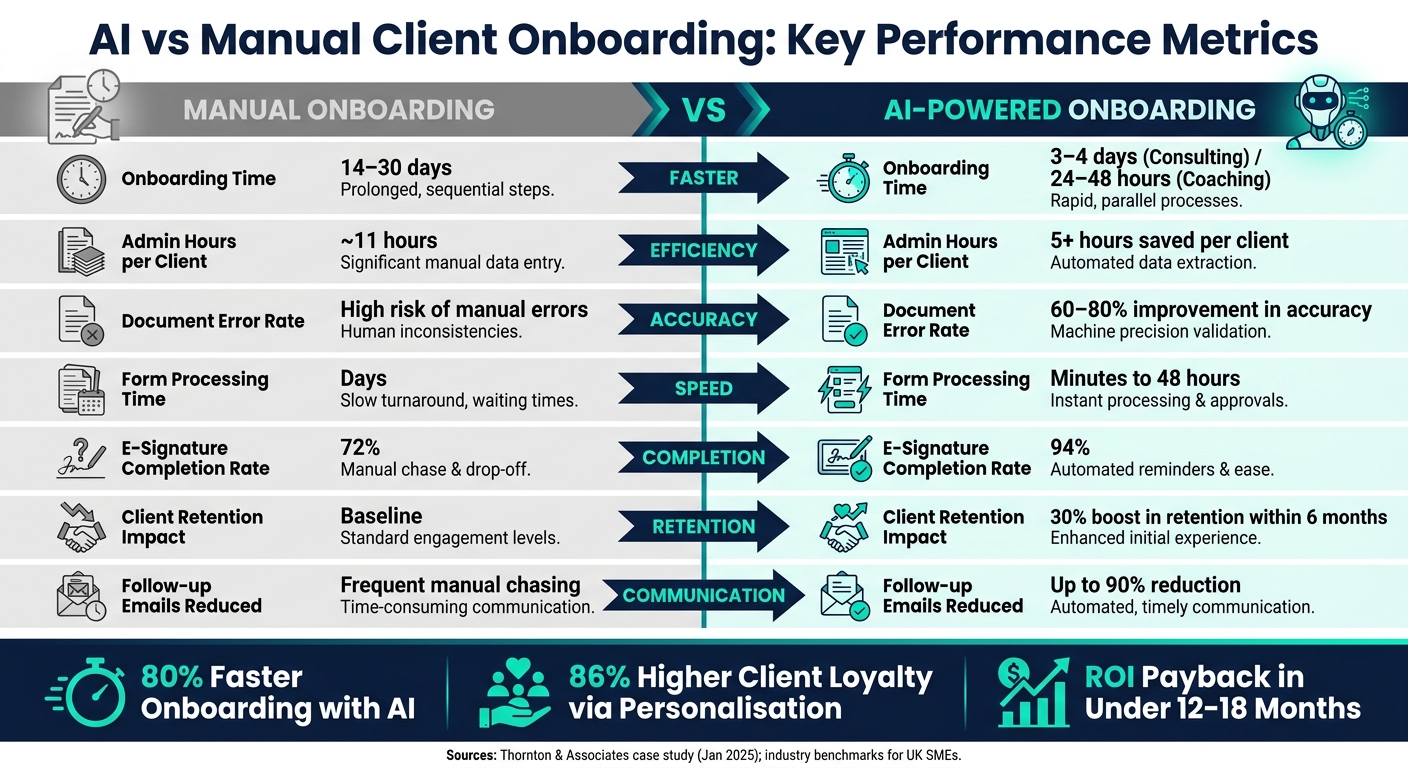
AI vs Manual Client Onboarding: Key Performance Metrics
Mapping Your Onboarding Workflow and Setting Goals
Before incorporating AI tools into your onboarding process, you need a clear understanding of your current workflow.
Defining Your Current Workflow
Begin by documenting every step of your onboarding journey, from the moment a client signs up to their full activation. This includes emails, forms, meetings, and internal handoffs. The result? A workflow map that outlines who handles each task, when they do it, and how long it takes. This map helps you pinpoint inefficiencies that AI could streamline.
Once your workflow is mapped out, divide the tasks into two categories. First, there's the variable content - the specialised expertise, legal advice, and strategic thinking that only your team can provide. Then there's the structural process - the administrative tasks like creating records, sending forms, and chasing signatures. As James Thornton, Managing Partner at Thornton & Associates, explained after automating his firm's onboarding process in January 2025:
"We kept saying everything we do is different. But when you mapped the actual process, what was different was the legal content - and you didn't touch that. What you automated was the container around it."
The structural process is where AI shines. Typically, 20% of workflow steps account for 80% of the total onboarding time and are prone to rework. Identifying this 20% is your first step towards improvement.
A detailed workflow map lays the groundwork for introducing AI into your onboarding process, ensuring every adjustment enhances client satisfaction. Once the map is complete, set measurable goals to address inefficiencies.
Setting Measurable Objectives
Establish clear KPIs before implementing AI. The most practical metrics typically fall into these categories:
| Metric Category | KPI | AI-Optimised Target |
|---|---|---|
| Speed | Time to onboard (cycle time) | 3–4 days (consulting) / 24–48 hours (coaching) |
| Efficiency | Manual labour hours per client | Reduction of 5+ hours per client |
| Accuracy | Document error rate | 60–80% improvement in intake accuracy |
| Retention | First-year churn rate | 10% reduction in voluntary churn |
| Financial | Payback period | Under 12–18 months |
Additionally, monitor Time-to-Value to ensure clients quickly receive meaningful deliverables. Keep an eye on intake completion rates too; if clients frequently abandon forms halfway through, that’s a clear bottleneck AI can address. Once your KPIs are in place, track them consistently to assess AI’s impact.
To evaluate the financial viability, calculate the payback period using this formula: Implementation Cost ÷ Monthly Savings. For UK-based SMEs, pilot AI onboarding projects typically cost between £5,000 and £15,000, while full-scale implementations range from £6,000 to £12,000.
UK-Specific Compliance Considerations
If your automated onboarding process handles personal data, it must comply with UK GDPR. This includes having a lawful basis for processing, minimising data collection, and ensuring any US-based AI tools have valid data processing agreements (DPAs). Ideally, sensitive client data should remain in UK or EEA-controlled environments.
For businesses regulated by the FCA - such as those in FinTech, financial services, or carbon markets - compliance is more complex. KYC and AML workflows must adhere to the Money Laundering Regulations 2017, including automated checks for Politically Exposed Persons (PEPs) and sanctions lists. The FCA Consumer Duty adds another layer, requiring that automated processes avoid creating unreasonable barriers for retail clients or issuing unclear communications.
Maintain human oversight for high-risk decisions. Use AI for tasks like document classification and initial screenings, but ensure a senior team member reviews critical cases - such as PEP matches, source of wealth assessments, or edge cases - before final decisions are made. Every AI action should be logged with a time-stamped audit trail to meet both regulatory requirements and internal governance standards.
sbb-itb-1051aa0
How to Design an AI-Enhanced Onboarding Process
Once your workflow is mapped out and your KPIs are set, the next step is figuring out exactly where AI fits into the process - and where it doesn’t.
Identifying Tasks Suited to AI Automation
A helpful way to break this down is the 10-20-70 rule: about 10% of tasks can be fully automated (like sending confirmation emails or handling account provisioning), 20% benefit from AI working alongside human oversight (such as drafting welcome messages or flagging incomplete documents), and the remaining 70% are best left to humans (like relationship building, offering strategic advice, or solving complex problems).
Tasks that are repetitive, predictable, and occur frequently - such as sending intake forms or creating folders - are perfect for automation. The key is to identify a reliable automation trigger, such as a signed contract or a completed payment, to set the workflow in motion. For unique or VIP cases, it’s important to have an "escape hatch" to route these to a manual process.
"The automation doesn't do the expertise. It handles everything else so the expertise has more time to do its job." - James Thornton, Managing Partner, Thornton & Associates
Core AI Capabilities to Include
Once you’ve identified which tasks to automate, the next step is equipping your system with the right AI tools. Here are four capabilities worth prioritising:
- Document intelligence: This allows AI to read forms, extract key details (like names, addresses, and dates), and validate documents such as NDAs or contracts. By eliminating manual data entry, this can cut follow-up emails by up to 90% and speed up onboarding by as much as 2×.
- Workflow orchestration: This feature connects your systems, automating repetitive tasks like updating your CRM, creating project folders, and notifying your team when a deal closes. AI agents can work simultaneously - one verifying documents while another sets up system access - reducing onboarding timelines by 30–40%.
- Conversational interfaces: Tools like AI-driven chatbots or automated welcome sequences handle routine client queries 24/7. This not only reduces the workload on your team but also starts building client trust from the very beginning.
- Automated data validation: AI can audit intake forms for missing fields, formatting errors, or compliance risks before they even reach a human reviewer. This reduces the back-and-forth that often slows down onboarding.
Connecting AI with Your Existing Systems
The effectiveness of these capabilities depends on how well they integrate with your current tools. An AI system that can’t communicate with your CRM or project management software will only add to your workload.
To ensure smooth integration, middleware can link your CRM, document signing tools, scheduling software, and AI engine. The aim is seamless data flow: when a client signs a contract, your CRM updates automatically, a project folder is created, an intake form is sent, and your team is notified - all without manual input. Maintaining an auditable data flow is essential to comply with UK GDPR regulations.
Specialist developers can make a big difference here. For example, Antler Digital specialises in building AI workflows and integrations tailored for SMEs. They connect tools like document processing and workflow orchestration directly into CRMs and client portals, ensuring a consistent and auditable flow of information across internal systems and client-facing platforms.
"The best automated onboarding experiences feel more attentive than manual ones because they respond instantly at every step." - Digital Applied
AI Use Cases Across the Onboarding Process
Automating Data Collection and Validation
Manual data collection is often a slow, error-filled process. Teams spend hours chasing incomplete forms and fixing mistakes, which can frustrate both staff and clients.
AI offers a smarter approach. Instead of overwhelming clients with lengthy forms, AI-powered systems use conditional logic to display only the most relevant questions. They can even pre-fill fields like a company name based on an email domain, cutting down form completion time from days to just minutes.
Behind the scenes, automated validation tools cross-check submitted information with public databases and internal records in real time. If there’s a mismatch or missing document, the system flags it instantly and sends personalised reminders to clients.
| Feature | Manual Data Collection | AI-Assisted Data Collection |
|---|---|---|
| Processing Time | ~11 hours per client | Minutes to 48 hours |
| Accuracy | High risk of manual errors | 60–80% productivity boost via automated validation |
| Client Experience | Often seen as slow or disorganised | 30% higher retention due to faster service |
| Validation | Manual record checks | Real-time cross-referencing |
| Follow-ups | Manual email chasing for missing info | Automated, contextual reminders |
Once the data is validated, the next step is tackling document processing.
Faster Document Processing with AI
After collecting data, reviewing and validating documents can become a major bottleneck. This is where Intelligent Document Processing (IDP) steps in. Using tools like OCR (Optical Character Recognition) and Natural Language Processing, AI extracts structured data from unstructured files such as PDFs, scanned IDs, or email attachments.
For example, an AI system can scan a passport, pull out key details, verify them against your records, and flag inconsistencies - all before a human reviewer even looks at the document. This is especially helpful for UK businesses navigating UK GDPR, Anti-Money Laundering (AML) rules, and FCA requirements around fairness and explainability.
| Document Type | AI Action | UK Compliance Check |
|---|---|---|
| Identity Docs (Passport/Driving Licence) | OCR extraction and validation | UK GDPR / AML verification |
| Engagement Letters | Auto-fill templates and e-signature tracking | Contractual necessity (Art. 6 GDPR) |
| Client Questionnaires | Input validation and CRM syncing | Data minimisation principle |
| Financial Statements | Data classification and risk scoring | FCA fairness and explainability rules |
One standout example comes from Thornton & Associates, a UK law firm. When they automated their document workflows in January 2025, they saw e-signature completion rates jump from 72% to 94%. This efficiency gain helped recover approximately £10,400 per month in previously unbilled capacity.
With documents handled quickly and accurately, AI can also simplify scheduling and coordination.
Automating Scheduling and Coordination
Even after streamlining data and document tasks, scheduling can still be a pain point. A simple kickoff call often turns into a series of back-and-forth emails, missed responses, and delays that leave clients feeling undervalued. AI eliminates this hassle by automatically sending a scheduling link as soon as a contract is signed or payment is confirmed.
AI doesn’t stop at the initial booking. It can scan signed agreements to pull out key dates - like review meetings, renewal deadlines, or project milestones - and update shared calendars without human input. If a client hasn’t booked their kickoff call within 48 to 72 hours, automated follow-ups ensure nothing falls through the cracks. Internally, a single trigger in your CRM can set up project boards, open communication channels, and assign team members based on their expertise and availability.
"A five-person team with a well-designed onboarding system can make a client feel like they are working with a hundred-person operation." - Anmol Gupta, Founder, PhotonMan
AI isn’t about replacing human interaction; it’s about clearing the administrative clutter. By automating these tasks, your team can focus on building relationships through welcome calls, kickoff meetings, and meaningful conversations.
Tracking Results and Improving Over Time
Key Metrics to Track
Once you've implemented an AI-powered process, the next step is to measure how well it's performing. Automation might streamline tasks, but without tracking the right metrics, you won't know where it falls short.
Focus on three main areas: efficiency, client success, and financial health. For efficiency, keep an eye on metrics like Time to Onboard and the number of hours saved on admin tasks per client. Client success metrics include Time to Value (TTV), which measures how quickly clients achieve their first meaningful result, and the completion rate for onboarding. Financial metrics, such as early churn (clients leaving within the first 90 days) and Net Revenue Retention (NRR), show whether your onboarding process is helping to secure long-term revenue.
| Metric | What It Measures | Target |
|---|---|---|
| Time to Onboard | Time from sign-up to independent use of your service | As short as possible |
| Onboarding Completion Rate | Percentage of clients completing all onboarding steps | 85%+ |
| Time to Value (TTV) | Time from sign-up to the first success milestone | As low as possible |
| 90-Day Churn Rate | Percentage of clients lost within the first 90 days | As low as possible |
| Support Ticket Volume | Number of support tickets raised during onboarding | Declining month-on-month |
A key but often overlooked metric is support ticket volume. If you see a surge in tickets during the first month, it’s a red flag. It might mean that your process has confusing steps, missing prompts, or gaps in communication. Interestingly, only 36% of organisations currently track metrics that directly link AI onboarding to revenue outcomes. This means even basic tracking can give you an edge over competitors.
Using Feedback Loops to Improve Workflows
Tracking alone isn’t enough - you need feedback loops to spot and fix issues early.
AI analytics can help pinpoint where clients drop off, whether it’s an abandoned form, a missed document submission, or a milestone that requires too many manual follow-ups. Tools like CRM-based health scoring can assign risk scores to onboarding accounts based on factors like milestone completion or inactivity. For example, if a client hasn’t engaged for more than 72 hours, the system can automatically alert account managers. In 2026, JustPark used this method to identify stalled onboarding projects in real time, allowing their leadership to step in and reduce delays during the critical early stages of client relationships.
"AI handles the repetitive, time-consuming coordination work... CSMs get their time back to focus on the relationships and strategic moments that actually drive retention." - Melissa Scatena, Marketing Operations Lead, OnRamp
Feedback isn’t just about clients, though. Internal teams play a crucial role too. If your staff report that automation is causing confusion - like broken integrations or missed edge cases - that’s valuable input. Regular reviews of bottlenecks, combined with weekly operational check-ins, can keep workflows running smoothly and evolving.
As you refine your processes, don’t forget to prioritise compliance.
Keeping AI Systems Compliant and Up to Date
For long-term success, it’s essential to monitor both operational performance and regulatory requirements. This builds on the earlier steps of workflow mapping and AI integration.
AI systems need regular maintenance. Models can drift, regulations can change, and API connections between your CRM, document tools, and AI platforms can break when updates occur. Instead of revisiting the entire compliance framework, focus on periodic reviews. Make sure your agreements with third-party platforms (DPAs) are up to date, confirm that data residency arrangements remain valid, and check that client communications continue to meet FCA Consumer Duty standards as your workflows evolve. For sensitive data like KYC and AML, private cloud environments are still recommended over public AI APIs.
"AI should augment human judgement in onboarding, not replace it. Getting the balance right is essential for both compliance and quality." - Evolve AI
Regularly assess AI accuracy and confidence scores, and ensure low-confidence cases are escalated to human oversight. This human-in-the-loop approach isn’t just a good idea - it’s a regulatory requirement for high-stakes decisions like PEP matches or categorising high-risk clients. By building clear "escape hatches" for unusual cases, you can ensure your automation doesn’t create blind spots as your client base expands.
Conclusion: Building Better Onboarding with AI
AI doesn't just make onboarding faster - it redefines what's achievable. Companies leveraging AI for client onboarding have seen a 30% boost in customer retention within the first six months. Even more impressive, onboarding timelines have been reduced from weeks to just days, signalling a major shift in how businesses engage with clients.
But it’s not just about speed. AI brings added value by ensuring compliance, automating audit trails, reducing errors, and freeing up senior staff to focus on what truly matters - building strong client relationships.
Striking the right balance is key. Automating administrative tasks while maintaining meaningful connections is what sets a smart AI-driven workflow apart from one that simply accelerates existing issues. This requires careful process mapping, strong integrations, and continuous upkeep to ensure compliance and accuracy.
To truly harness the potential of AI and avoid automating flawed processes, it's essential to work with a technical partner who understands the intricacies of scalable and compliant workflows. Antler Digital offers expertise in creating tailored AI integrations and workflows for SMEs. With experience across industries like FinTech, SaaS, and professional services, they ensure your onboarding process is primed for success from the very start.
FAQs
Which onboarding tasks should I automate first with AI?
Streamline your processes by automating tasks that often eat up valuable time, like gathering documents, sending tailored welcome emails, or organising internal projects. These automated steps not only simplify workflows but also cut down on manual labour and help create a consistent, polished first impression. Plus, by speeding up onboarding, you increase the chances of keeping clients engaged during those crucial first 90 days.
How can I use AI in onboarding while staying UK GDPR and FCA compliant?
To comply with UK GDPR and FCA regulations, AI can be a powerful ally for automating tasks like document collection, data verification, and client communication. However, maintaining data privacy and security is essential. Here's how to stay on track:
- Use AI tools with encryption and secure storage: Protect sensitive information by ensuring all AI systems have robust encryption and secure storage solutions in place.
- Automate KYC/AML checks: Streamline compliance processes by automating "Know Your Customer" (KYC) and Anti-Money Laundering (AML) checks, reducing manual errors while speeding up verification.
- Maintain audit trails and transparency: Keep detailed records of AI decisions and processes to ensure accountability and meet regulatory requirements.
It's also important to regularly review and update workflows to align with changing regulations. Be transparent with clients about how their data is being used to build trust and ensure compliance.
What systems should AI onboarding integrate with to work end-to-end?
To create a smooth AI-driven client onboarding process, integrating with essential platforms is a must. Key systems to consider include:
- CRM platforms (e.g., HubSpot): These help manage client information efficiently, keeping all data organised and accessible.
- Document signing tools (e.g., DocuSign): Secure and seamless contract signing becomes hassle-free with tools like these.
- Billing systems: Automating invoicing ensures timely and accurate financial transactions.
Automation tools play a crucial role in simplifying repetitive tasks such as notifications and data entry, saving time and reducing errors. Equally important is adhering to UK GDPR regulations, which guarantees secure data management. By combining these elements, businesses can achieve an efficient, error-free onboarding experience that boosts client satisfaction.
if (valuable) then share();