AI Personalisation for SaaS Platforms
AI personalisation that speeds activation, boosts retention and fits UK/EU compliance—practical roadmap for SaaS teams.
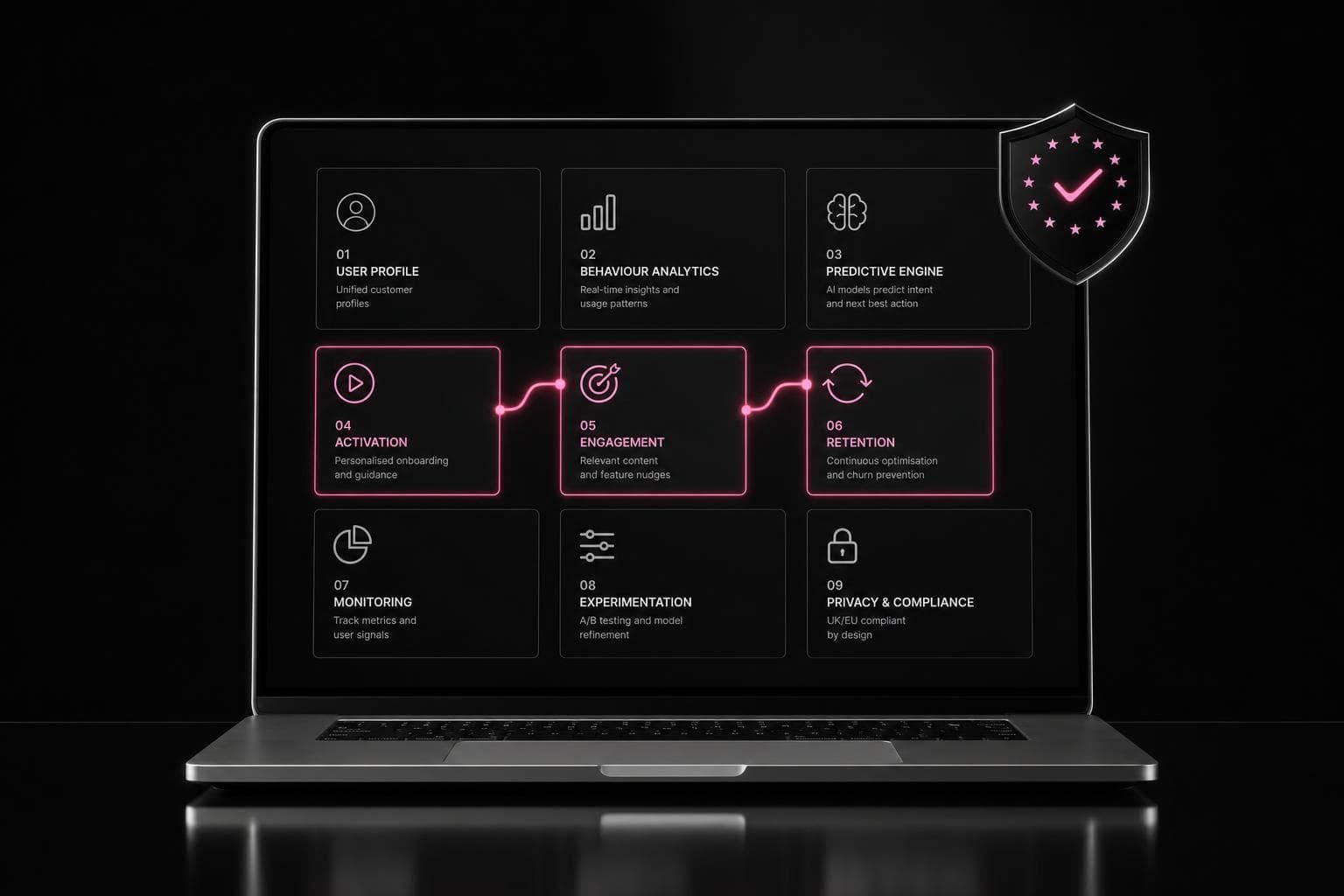
If I had to boil this down to one point, it’s this: AI personalisation works when it gets users to value faster. In SaaS, that usually means better onboarding, smarter in-app prompts, and lifecycle messaging that reacts to behaviour instead of fixed rules.
Here’s the short version:
- Personalised onboarding can lift trial-to-paid conversion by 10% to 30%
- Retention can improve by 15% to 35%
- Intent-based sign-up routing can beat generic onboarding by 15% to 25%
- AI support flows can deflect up to 70% of tickets
- Real-time personalisation needs low-latency delivery, often under 200 ms
What matters most is not fancy models. It’s the setup behind them:
- a single customer profile built from product, account, and outcome data
- clean event tracking and naming rules
- enough content variants for each journey stage
- clear UK and EU data rules, audit logs, retention limits, and human review where decisions affect access or price
I’d split the whole topic into four plain questions:
-
Where should I use it first?
Start with onboarding, feature discovery, upgrade prompts, or support guidance. -
What data do I need?
Behavioural signals, account details, and outcome data joined in one place. -
How should I roll it out?
Begin with one pilot flow, run it against a holdout group for about six weeks, then expand only if activation or time-to-value improves. -
How do I keep risk under control?
Use data minimisation, DPAs with vendors, UK/EU hosting where needed, and human checks for high-impact automated decisions.
A simple way to think about it: rule-based personalisation uses what a user said at sign-up; AI personalisation uses what they actually do next. That shift is where most of the gains come from.
The rest of the piece explains where those gains tend to show up, what data and systems sit behind them, how to measure lift, and when outside technical help may make more sense than building everything in-house.
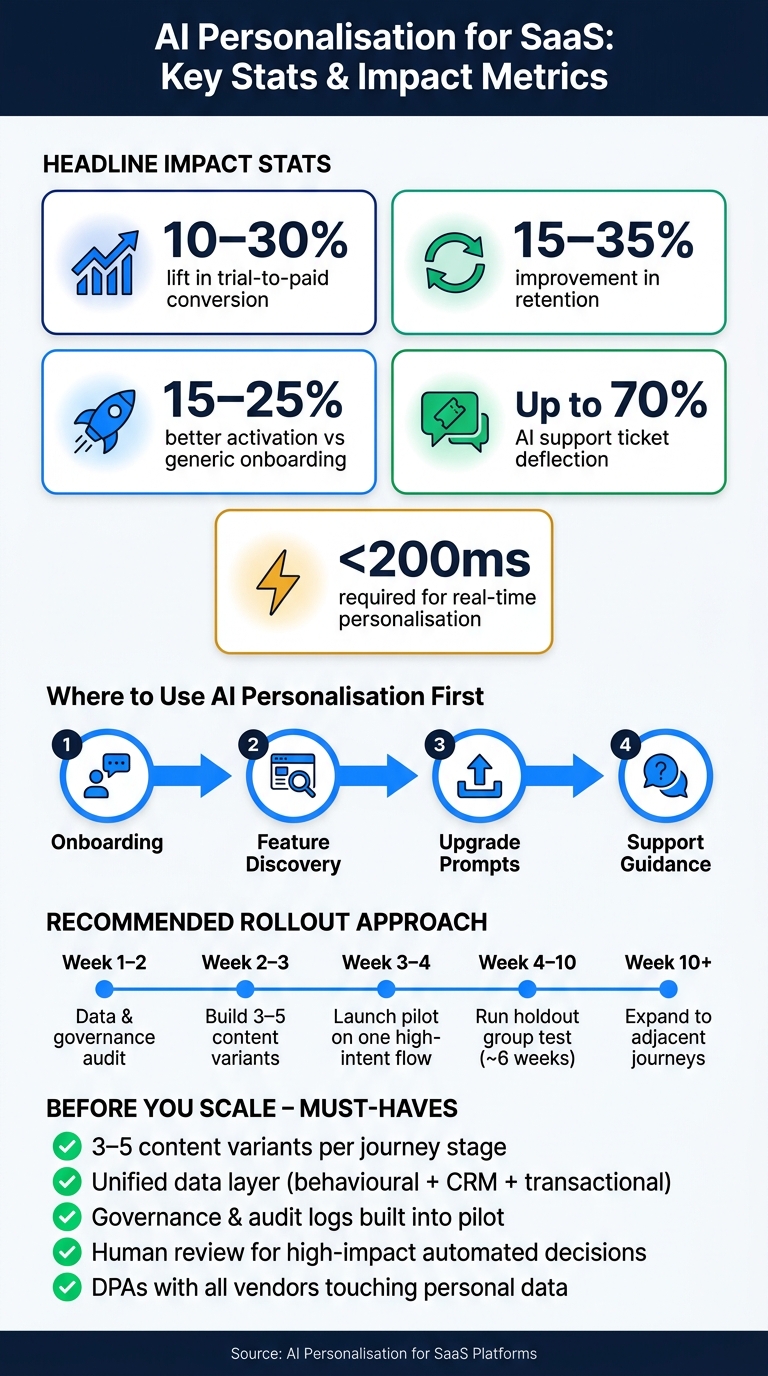
AI Personalisation for SaaS: Key Stats & Impact Metrics
The data and architecture behind AI personalisation
Data foundations: events, attributes and outcomes
Those in-product experiences only work if event, account and outcome data are collected cleanly. If the signals are messy, the model will be messy too.
Before any model runs, you need clean, steady inputs inside one customer profile. In practice, that means three main data types: behavioural data such as clicks, feature usage and session patterns; account attributes such as role, industry, company size and plan tier; and outcome data such as activation milestones, renewal history and support ticket status.
A lot of teams miss this bit. They spend time on models, then skimp on instrumentation. That usually comes back to bite them. Consistent naming conventions and schema validation are what stop a personalisation system from drifting over time. A customer data platform sits in the middle of all this, joining behavioural, transactional and CRM data into a single profile.
Real-time vs batch personalisation
Use real-time for in-session decisions and batch for scheduled ones.
If you're making a decision while someone is using the product - say, showing a tooltip or sending them to a different onboarding step - the response needs to feel instant. Sub-200ms is the benchmark if you want to avoid visible lag. That calls for event streaming, low-latency APIs and edge caching.
Batch processing is different. It runs on a set schedule, whether that's hourly, daily or weekly. It fits jobs like churn risk scoring, usage summary emails and onboarding nudge sequences. It's cheaper to run and easier to maintain.
| Real-time | Batch | |
|---|---|---|
| Latency | Sub-200ms | Hours to days |
| Infrastructure | Event streaming, real-time APIs, edge caching | ETL pipelines, data warehouse |
| SaaS use cases | In-app tooltips, next-best actions, dynamic dashboards | Weekly usage summaries, onboarding email nudges, churn risk scoring |
| Cost | Higher (continuous compute) | Lower (scheduled, off-peak processing) |
| UX impact | Responds to live session intent | Sustained engagement over time |
Most SaaS products need both. A sensible starting point is batch processing, then real-time decisions can be added to high-traffic product flows where speed changes the user experience.
Privacy, governance and UK/EU compliance basics
Once the data layer is set up, governance stops being a legal side note and becomes part of the system design.
UK GDPR shapes what you collect, where you store it and how you use it. In B2B SaaS, legitimate interest is often used as the lawful basis for behavioural personalisation, though consent or an existing customer relationship basis may fit better depending on the use case.
There is also a line you don't want to cross. Under UK GDPR Article 22, solely automated decisions with significant effects are restricted. So if you're changing pricing or access, a human-in-the-loop safeguard should be part of the process.
Data minimisation matters as well. Only collect and process the signals you're actively using in your models. If a data point has no job, it probably shouldn't be there.
For processors, make sure Data Processing Agreements (DPAs) are in place with every tool that touches personal data. That includes your customer data platform, your data warehouse and your email platform. Data should be stored in UK or EU data centres. It also helps to keep audit logs for automated decisions and clear retention policies in place.
sbb-itb-1051aa0
Practical AI personalisation methods for SaaS products
Segmentation and recommendation systems
A simple change at sign-up can make a big difference. Ask one question - such as what the user wants to get done - and send them into the right onboarding path. That can beat generic onboarding by 15–25%. Behaviour-based personalisation also tends to do better than static segments built only around role or industry.
ConvertKit is a good example. Users moving over from another platform go straight to contact importing, which means they skip beginner tutorials they do not need. It’s a small shift, but it removes friction fast.
A solid way to do this is to start with the user’s stated goal, then tighten recommendations based on what they do in the product. If someone uses one feature, show another that fits naturally with it. If they keep returning to the same settings page, surface help content there instead of making them hunt for answers.
That same behaviour data can shape more than recommendations. It can also change the interface itself and the copy a user sees.
Dynamic interfaces and generative content
Sometimes recommendations alone will not do the job. In those cases, it helps to tailor the interface and the wording on screen.
Dynamic interfaces work best when headlines, proof points, and calls to action are built in modules that AI can assemble in real time. ClickUp does this well by letting users switch features on or off by subscription tier, which keeps the product simpler for people who do not need advanced tools.
Generative content pushes this a step further. It can produce tailored onboarding checklists, contextual help copy, or support guidance based on where someone is in their journey. But there is a catch: if you do not have enough content variants, the system runs out of useful options fast. Build three to five variants per journey stage before you turn on dynamic delivery.
For generated outputs, an AI-drafted, human-reviewed process helps keep brand voice steady and spots accuracy problems before users see them.
Agentic workflows for SME-focused SaaS
Some user journeys move too fast and change too often for fixed rules. That is where agentic workflows come in. They watch activity all the time and trigger personalised actions from real-time signals instead of relying only on pre-set conditions.
Think about a user who stalls halfway through onboarding, visits the pricing page three times in 48 hours, and then opens a support ticket. Those signals, taken together, say a lot. A rigid rule set may not join those dots.
As these journeys become more autonomous, behavioural data can shape the whole flow. In April 2026, Contentstack launched an AI-driven digital concierge using real-time behavioural data from Lytics. The result was an 85% feature discovery rate and a 20% conversion lift for returning visitors, with the system changing the journey on its own based on intent signals.
The table below shows how agentic actions map to common lifecycle moments:
| Lifecycle Stage | Agentic Action | Data Signal Required |
|---|---|---|
| Sales hand-off | Generate automated conversation summary for CSM | Deal stage moved to Closed-Won |
| Retention | Trigger proactive in-app help for usage gaps | Feature adoption below threshold for 5 days |
| Support | Escalate directly to human specialist | AI-detected negative sentiment |
For SME-focused SaaS teams, the upside is pretty clear. AI agents handling routine queries have reached up to a 70% ticket deflection rate, which gives small teams more time for higher-value customer work. A smart way to start is to pick one high-impact moment - like the hand-off from sales to onboarding - automate one next-step trigger, and then expand once that first trigger proves it can work.
Implementation roadmap, measurement and operating model
Once the workflow logic is clear, the next thing to test is simple: can your data, governance and delivery setup actually support it?
A step-by-step rollout plan
With the use case locked in, prove value in one flow first. Then expand.
Start with a data-readiness and governance audit. Check that event tracking is clean, user profiles are joined up, and your data layer brings together CRM, behavioural and transactional data. Build retention rules, audit logs and human review into the pilot from day one.
From there, pick one high-intent page or flow for the test. That could be the homepage, pricing page or demo request form. Before launch, prepare three to five variants for that pilot flow.
Once the pilot is live, test it against a strict holdout group. That’s how you separate the effect of personalisation from selection effects. Run the pilot for around six weeks. Then review the results before moving into nearby flows, such as dashboards and upgrade prompts.
Before scaling, lock down governance properly. Define a personalisation policy covering data use and approvals, and set quarterly refreshes to limit model drift.
After the pilot goes live, judge it by activation and time-to-value, not overall traffic.
How to measure business impact
Blended, site-wide conversion rates can hide what’s happening. A better way is to measure lift by segment, persona and traffic source.
Start with activation rate and time-to-value. These are the earliest signs that personalisation is working. Then track the broader metrics below.
| Metric | Definition | Measurement Method | AI impact |
|---|---|---|---|
| Activation Rate | % of new users reaching a defined "Aha" moment | Track completion of key setup events such as the first report run | Routes users to the shortest path based on declared intent at sign-up |
| Time-to-Value (TTV) | Time from sign-up to first successful outcome | Time elapsed between account creation and first key action | Reduces friction by pre-loading relevant demo data or persona-specific templates |
| Feature Adoption | % of users engaging with secondary features | Event tracking on specific UI elements or feature modules | Triggers contextual tooltips only when behavioural signals indicate readiness |
| Upgrade Rate | % of users moving to a higher-tier plan | Conversion rate of expansion prompts or pricing page visits | Fires prompts when usage limits are approached |
| Net Revenue Retention (NRR) | Revenue retained from existing customers, including expansions | (Starting MRR + Expansion - Churn) / Starting MRR | Personalised re-engagement nudges help prevent accounts going quiet |
| Support Deflection | % of queries resolved without human intervention | Ratio of AI-resolved sessions to total support tickets | Personalisation data enables specific, relevant answers, reducing service costs |
| Customer Lifetime Value (CLV) | Total revenue per customer over time | Average order value × purchase frequency × lifespan | Higher retention and expansion increase total value over time |
In-house delivery vs specialist technical support
If the pilot shows lift, the next call is whether your team can keep it running and scale it in-house.
The right model depends on data quality, compliance load and available engineering time. In-house delivery tends to work best when you already have strong data engineering, clean event tracking and engineers who can maintain a personalisation layer without it clashing with core product work. The main risk is straightforward: engineering time becomes the bottleneck, not the tech itself.
Specialist technical support tends to help most when speed matters, your data is split across different systems, or compliance duties under UK GDPR and the UK Data Protection Act are putting pressure on the internal team. A specialist setup can usually go live in four to six weeks, compared with six months or more for a custom in-house build.
| Capability | In-House Delivery | Specialist Technical Support |
|---|---|---|
| Time to Production | Often 6+ months for custom builds | Typically 4–6 weeks for initial setup |
| Capability Ceiling | Often limited to rule-based logic | Predictive intent and real-time orchestration |
| Scalability | Constrained by internal engineering sprints | High; uses agentic workflows and automated variant generation |
| Governance Burden | Internal team manages GDPR/DPA audits manually | Compliance frameworks are often built in |
| Maintenance | High; rules drift and require ongoing attention | Managed; includes model retraining and ongoing technical oversight |
For SaaS teams dealing with complex architectures, Antler Digital can help with custom web applications, AI integrations and agentic workflows.
Conclusion: How to start with AI personalisation in SaaS
Once a pilot shows lift, the job changes. It’s no longer about running one more test. It’s about scaling the right flow.
AI personalisation tends to work best when it improves a single product outcome. Not when it’s added as a bolt-on feature that sits awkwardly on top of the product. The teams that get the strongest results usually begin with one clear use case. A good example is onboarding: moving from generic onboarding to personalised flows can improve activation rates.
The best place to start is often simpler than teams think. Ask one high-leverage question at sign-up, such as “What are you trying to do first?”, then send users into a first-session experience that matches that intent. That kind of intent-based routing tends to beat generic onboarding by 15–25% on activation metrics.
From there, test the lift with a holdout group. If the numbers hold up, expand into nearby journeys like upgrade prompts and in-app guidance.
As the pilot grows, the same rules still matter: unified data, enough variants, and clear governance. The main point of failure usually isn’t the tech. It’s thin content coverage and fragmented data. AI engines can’t personalise what doesn’t exist.
Before scaling, make sure you have:
- Three to five content variations for each journey stage
- A unified data layer that brings together behavioural, CRM, and transactional signals
- Governance built into the pilot from day one
Antler Digital can help build the data layer, AI integrations, and agentic workflows needed to operationalise personalisation.
FAQs
How much data is enough to start?
You don’t need a huge bank of past data to get started. Begin with behaviour-based content on your highest-traffic pages and in nurture sequences, where the data is clearest and the path to conversion is easier to track.
For new users, lean on contextual signals like referral source, device type, page content, and any first-party data they’ve agreed to share. Even one sign-up question about their goal can point them into a relevant, personalised first-session flow.
When should I use real-time personalisation?
Use real-time personalisation when you need to react to what a user is doing right now, not what they did in the past.
It’s especially handy for cutting confusion. If someone seems stuck, you can show a helpful tip at the moment they need it, instead of making them hunt for answers.
It also works well on high-traffic pages. Content, CTAs, and onboarding flows can shift in milliseconds to line up with the user’s current intent.
How do I prove AI personalisation is working?
Use A/B testing with a holdout group that sees the non-personalised version of your site. That gives you a cleaner read on what personalisation is doing, instead of mixing the result up with selection bias.
Track the outcomes that map to your goals, like activation rates, form completions, or pipeline progression. It also helps to watch performance across behavioural cohorts, measure lift by variant, and focus on high-intent pages, where you can reach statistical significance faster.
if (valuable) then share();