AI Personalisation for SaaS User Journeys
Make SaaS user journeys finish tasks faster: start rules-first, connect reliable signals, measure task completion and protect personal data.

AI personalisation should help SaaS users finish tasks - not add more prompts. Start with one journey problem, such as incomplete setup, and test one intervention against the current experience. Measure a clear outcome, such as activation within 14 days, rather than clicks alone.
A useful approach covers five steps:
- Connect reliable data: Link user and account signals while keeping roles, permissions and preferences separate.
- Match help to the task: Use rules first, adding AI only where it improves onboarding, feature discovery, support, retention or expansion.
- Keep users in control: Explain suggestions, allow dismissal and keep the standard journey available.
- Check results and risks: Compare outcomes with a control group, monitor errors and set rollback limits.
- Protect personal data: Check UK GDPR and PECR requirements, restrict access and assign named owners before launch.
Scale only when users complete tasks more easily and the gains outweigh privacy, usability and running costs.
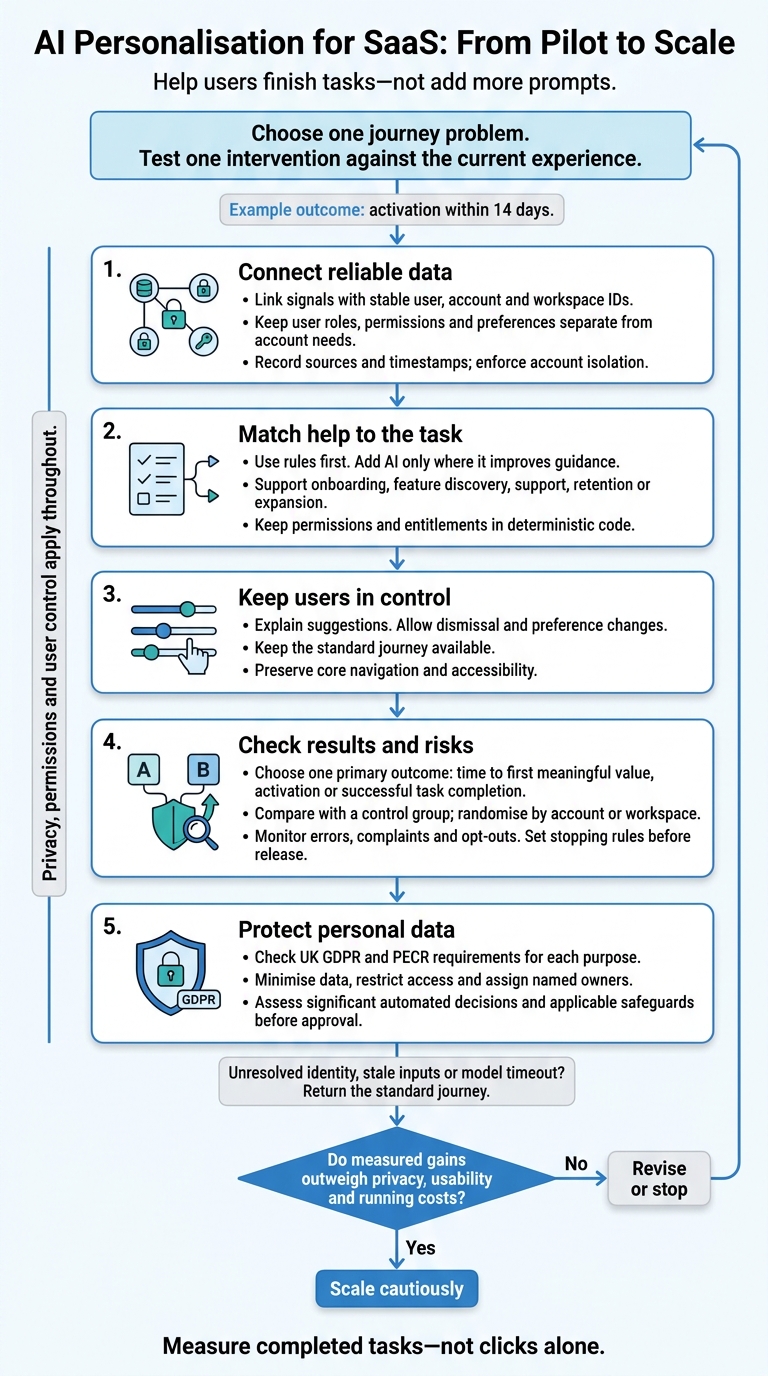
AI Personalisation for SaaS: From Pilot to Scale
Fragmented data: Connect user and account signals
Poorly joined data can send the wrong help to the wrong user. Product analytics, CRM and support data each show part of the journey. Link them through stable user, account and workspace IDs, recording a source and timestamp for every signal. First, establish which user and account each signal belongs to.
Separate user goals from account needs
Keep user and account data separate. Store role, permissions, usage, onboarding progress and preferences at user level. Keep plan, renewal and shared goals at account level.
Treat inferred intent as probability, not fact. Record the evidence, confidence, model version and expiry, and let users correct the inference. Behavioural predictions can fall within data-protection obligations.
Map journey decisions before choosing AI
For sign-up, activation, adoption, renewal and expansion, define the trigger, inputs, action, owner, success measure and fallback before choosing AI. Make clear whether the system helps a person, recommends an action or acts automatically.
Choose the simplest approach that supports the decision. Permissions and entitlements must stay enforced controls, not model predictions.
| Approach | Suitable tasks | Required inputs | Limitations | Fallback |
|---|---|---|---|---|
| Deterministic rules | Onboarding prompts; guidance after a known error | Reliable events, role, plan and journey state | Cannot interpret ambiguous behaviour | Standard journey |
| Predictive models | Estimating adoption risk or the next feature | Historical outcomes, labelled events and stable behavioural signals | Scores can be inaccurate | Suppress uncertain scores |
| Generative AI | Adapting explanations; summarising permitted context | Documentation, permission-filtered retrieval and relevant profile fields | Can invent details or expose restricted information | Approved template |
Check data quality and enforce access limits
Match identities using authenticated IDs, not email addresses alone. Check for duplicate accounts, stale roles, missing event properties, inconsistent plan names and impossible event sequences.
Maintain an event dictionary. Define which system owns each field, how often it updates and how to resolve conflicts. Document the lawful basis and any consent requirements for each use. Set retention periods by data type and remove unnecessary duplicates.
Enforce account isolation and role-based access at retrieval, generation and delivery. Limit records and generated content to the recipient’s permitted account or workspace. Test users with multiple workspaces, shared domains and similar account names.
Keep audit logs and use least-privilege service accounts. If identity or access is uncertain, provide generic guidance rather than risk sending account-specific help.
With the right data in place, match each journey stage to the simplest useful intervention.
sbb-itb-1051aa0
Generic guidance: Match help to each journey stage
Personalise the next useful action, not every screen. Define the outcome for each stage and one or two approved ways to help. Share interaction history across product, email and customer success channels so a dismissed prompt does not pop up elsewhere. Pause expansion messages while support issues remain unresolved. Record each intervention’s type, audience, timestamp, outcome and dismissal reason to enforce frequency limits and review total exposure.
Once the right signals are available, choose the smallest useful intervention for each stage.
Guide onboarding and feature discovery
Ask a few optional questions about the user’s goal, role and first task. Use the answers to tailor the initial checklist and recommended documentation, helping users reach their first useful outcome sooner. Adjust the guidance as relevant activity appears.
Combine stated goals with safe behavioural signals, such as account setup completion, team invitations or use of a relevant feature. Do not infer sensitive characteristics or treat an unanswered question as a negative preference.
Define what counts as stalled progress before offering help. Base contextual guidance on approved documentation and offer human support if it cannot resolve the problem. Judge onboarding by completed outcomes, not checklist completion alone.
Apply the same stage-based approach to retention and expansion, but treat them as separate needs rather than sending generic nudges.
Use retention and expansion signals with care
Declining activity or repeated support contact should prompt an offer of help - not a claim that someone intends to leave. Recommend additional capabilities only when observed needs justify them, and state any plan or permission requirements.
The example policy below uses only documented, permitted signals.
Journey stage
Observable problem
Permitted signal
AI decision
User-facing response
Success metric
Onboarding
User has not completed a stated setup goal
Selected goal plus incomplete setup step
Offer the next approved checklist item
Offer the next step or a goal change
Goal completion rate; time to first value
Feature discovery
User repeatedly performs a manual task
Repeated use of the same documented workflow
Recommend the related approved feature
Explain the benefit and allow dismissal
Feature adoption; task time
Support
User encounters the same error twice
Error code and relevant help article
Show verified troubleshooting content and offer support
Show the fix and offer human support
Error recovery; escalation rate
Retention
Activity declines
Decline in product activity, unresolved ticket or unfinished workflow
Offer assistance without labelling the user as at risk
Ask whether help with the workflow would be useful
Recovery of meaningful usage; satisfaction
Expansion
User reaches a documented capability or volume limit
Usage threshold plus role and account permissions
Suggest an approved capability or contact route
Explain the limit and available options
Qualified adoption, not unsolicited upgrade clicks
Keep users in control and interfaces consistent
Let users edit their goals and preferences. Provide relevant, not relevant and reset controls, plus a personalisation opt-out where applicable. Where practical, explain why guidance appears and let users dismiss or defer it. These choices should shape future recommendations, not just close the current prompt.
Allow AI to select only approved components and content patterns, within design tokens and accessibility rules. It may change emphasis or sequence, but must not hide core navigation or key functions. Keep keyboard access, focus order and component placement predictable so personalised guidance does not make familiar tasks harder.
Measure these interventions before extending personalisation to more of the experience.
Uncertain results: Measure outcomes and manage risk
Measure journey improvements against a baseline
Once the intervention is live, test whether it improves the target journey against the documented baseline. Choose one primary outcome: time to first meaningful value, activation or successful task completion. More clicks do not prove the journey is better. Track continued use, retention and expansion over a suitable follow-up period. Use clicks and session length only to help diagnose what’s happening.
Use a control group and randomise by account or workspace. Record eligibility, exposure and treatment version. Report absolute and relative changes, with confidence intervals where practical. Check results by role, plan and account size: one active user can mask colleagues who are stuck. Track feedback, complaints and opt-outs, too. Count fewer support tickets as a gain only if resolution quality, satisfaction and escalation rates hold up.
Monitor failures and set review responsibilities
If the pilot works, address failure modes before scaling. Keep an intervention register that names the product, engineering, data and privacy owners for each intervention, alongside a support escalation route and review frequency. Monitor incorrect recommendations, prompt fatigue, poor data, misrouted help and unequal journey support, including the loss of useful features.
Set stopping rules before release. Misleading guidance may trigger a rollback; access or billing errors should trigger immediate suspension and human review. Review the intervention again after material changes to the model, data or product.
| Intervention | Data used | Potential user impact | User-facing response | Human oversight | Release controls |
|---|---|---|---|---|---|
| Predictive recommendations | Product events, role, plan and preferences | Irrelevant, repetitive or unequal suggestions | Explain why the suggestion appears | Product and support review of errors and group outcomes | Offline evaluation, holdout testing, staged rollout and rollback |
| Generative guidance | Product documentation, workspace context, user prompt and permitted account data | Incorrect instructions or unsafe configuration | Identify AI-generated content; show sources and uncertainty where available | Human review of high-risk answers and an escalation path | Grounding tests, adversarial testing, response monitoring and versioned prompts |
| Automated account actions | Account status, billing, usage and business rules | Changes to access, charges or eligibility | Explain relevant decision factors and the challenge route | Named decision owner; meaningful human intervention for material consequences | Approval gates, simulation, audit logs, limits and a kill switch |
Apply UK privacy and automated-decision safeguards
Performance checks alone are not enough. Personalisation still needs a lawful basis. For onboarding prompts, support guidance and expansion offers, document that basis for each purpose, minimise data, set retention limits and use privacy-friendly defaults. Explain personalisation, analytics and any model-training use separately. Block incompatible reuse and support access, rectification, erasure, restriction, objection and portability rights where applicable. Complete a DPIA before processing likely to create high risks - not automatically for every AI feature.
Assess PECR separately for device storage/access and electronic marketing. Distinguish essential functionality, analytics and behavioural tracking rather than assuming all personalisation requires consent.
Safeguards follow the actual impact, not the model label: these categories can overlap. Most tutorial recommendations will not have legal or similarly significant effects. But solely automated decisions with those effects need closer assessment and safeguards: information about the decision, an opportunity to make representations, meaningful human intervention and a challenge route. The reviewer must be able to question and change the outcome.
The Data (Use and Access) Act 2025 changes this framework through staged commencement. Before approving significant automated decisions, confirm which provisions and commencement instruments are in force at publication. Do not rely on an unchanged description of the former Article 22 restrictions.
Implementation: Start with one measurable pilot
With the baseline and safeguards in place, run one controlled pilot before scaling.
Define the pilot, limits and fallback
Choose one journey problem, not the whole lifecycle. Before development starts, write a one-page brief that sets out the target segment, journey stage, permitted signals, excluded data, decision and user-facing response. Name the owner, review date and rollback threshold. Agree a fixed test period and minimum sample size. Don’t expand the pilot just because the deadline arrives.
Build the rules-first version before adding AI. Keep eligibility and entitlements in deterministic code. Use prediction, ranking or contextual generation only where it can improve guidance. Before launch, set limits for response time and cost per request, alongside release thresholds and rollback triggers.
If identity is unresolved, inputs are stale or the model times out, return the standard journey without interrupting the user’s task.
Once these rules are fixed, build the data connections, delivery process and review process around them.
Build integrations and assign ownership
Link journey events to user, workspace and account identifiers, while keeping permissions separate. Store only the signals you need, along with timestamps, preferences and consent status. Connect these to a decision API, content catalogue, experiment assignment and monitoring.
Version models, prompts, rules and content together, and record the version IDs behind each response. Log version IDs, not personal data.
Product owns the outcome and release. Engineering owns integrations and deployment; design owns messaging and accessibility; data owns evaluation. Privacy and security review the safeguards, while customer-facing teams check usefulness.
Before live testing, check for missing events, stale profiles, withdrawn preferences, cross-account access attempts and service outages. Keep human review for ambiguous or high-impact decisions.
Include documentation, handovers, access limits and incident ownership in the delivery plan.
Conclusion: Remove friction before adding automation
Once the data, controls and measurement are in place, check whether AI still reduces friction. AI personalisation should make tasks easier, not add automation for its own sake. First, see whether clearer navigation, better documentation or a simpler workflow solves the problem.
Use reliable user and account signals - the same permitted signals described above - to offer the right guidance when it’s needed. Let users dismiss suggestions and keep the standard journey available. Use only the personal data needed for the stated purpose, with privacy built into the design.
Compare results with the current journey: do users finish tasks sooner or need less support? Scale only when measured gains outweigh privacy, usability and operating costs - not just because clicks or session length increase.
FAQs
How much data do I need to personalise SaaS journeys?
You don’t need a long history of user data to get started. Begin with behaviour-based content on high-traffic pages and in nurture sequences that offer clear paths to conversion.
For new users, draw on referral source, device type, page content and first-party data. Even one sign-up question about their goal can help you shape a relevant journey. When data is limited, start with content-based filtering, then refine recommendations as you gather behavioural signals.
How can I test personalisation with few users?
Start with high-traffic pages and nurture sequences. You don’t need extensive historical data. Use contextual signals, one goal-focused sign-up question and content-based filtering drawn from product metadata to personalise early journeys.
Prepare three to five content variants for each stage. Test them against a strict holdout group for around six weeks, measuring activation and time-to-value, not traffic. Include audit logs and human checks from the start.
How do I calculate the ROI of AI personalisation?
Use A/B testing with a holdout group to separate personalisation’s effect from other factors and limit selection bias. Track metrics that match your business goals: activation rates, time-to-value, feature adoption, upgrade rates and net revenue retention.
Weigh revenue gains and cost savings against implementation and running costs.
For example, check whether AI-powered targeting cuts wasted spend or lowers the cost per interaction compared with manual support.
if (valuable) then share();