Agentic Workflows for Bottleneck Prevention
Spot queue growth early, diagnose causes, and take limited, auditable actions to reduce delays without shifting backlog.

Agentic workflows help prevent delays by spotting growing queues and taking only permitted action. Start with one workflow: track queue size, waiting time and deadline risk, then allow limited retries, task routing or escalation. Keep mandatory approvals with people.
The approach has four parts:
- Detect and diagnose: check queues, blocked tasks and dependency delays - not just completed work.
- Act within limits: cap retries and workload, prevent duplicate actions and require approval for sensitive changes.
- Test before execution: run in observation-only mode, with logs, stop conditions and a way to pause or undo actions.
- Measure the result: compare throughput, p95 completion time, failures, queue recovery, approval waits and cost against a baseline. The p95 shows the time within which 95% of completed cases finish.
Agents cannot fix missing staff or remove approval requirements. The goal is fewer delays without shifting the backlog elsewhere or increasing errors and cost.
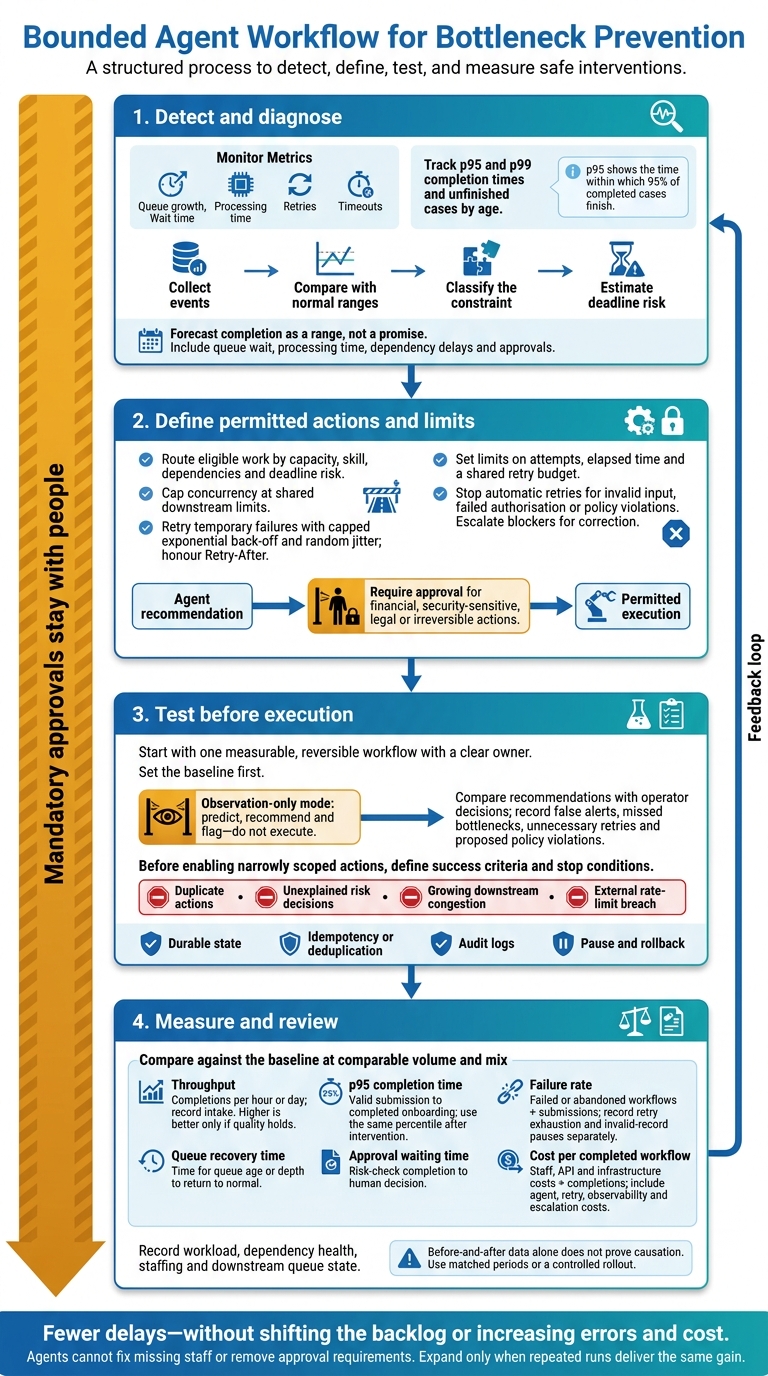
Agentic Workflows: Prevent Bottlenecks Safely
Detect bottlenecks before deadlines slip
When a queue starts growing, separate the build-up of work from the constraint behind it.
Track queues, delays and blocked tasks
Spot bottlenecks early by checking workflow events alongside service metrics: queue growth, wait time, processing time, retries and timeouts. Check API response times, rate limits, worker capacity, approval delays and blocked dependencies. Work can slow down before failures appear, so monitor delays directly.
Track end-to-end p95 and p99 completion times to reveal delays that averages hide. Compare the relevant percentile with the customer’s completion target over a consistent reporting window. Track unfinished cases by age, too: completed-case metrics leave out work that’s still waiting.
These signals show where work is slowing. Finding the cause takes another step.
Identify the cause and estimate deadline risk
Follow a fixed loop: collect events, compare them with normal ranges, classify the constraint, estimate its effect on deadlines and trigger an authorised response. Then record the outcome.
Use error codes and retry history to distinguish temporary dependency failures from errors that need correction. Set thresholds for exhausted retries, dependency outages and approaching deadlines. Use separate start and stop thresholds to prevent repeated switching.
Forecast completion as a range, not a promise. Include queue wait, processing time, dependency delays and approvals. Show the assumptions, confidence and sample size behind the forecast, and require sustained evidence before acting.
Trace delays through workflow events
When queue data shows a delay but not its cause, trace each case through the workflow. Process mining reconstructs case paths, showing repeated waits, rework and unexpected hand-offs as evidence of bottlenecks. Workflow observability links these delays to specific tasks and dependencies.
Record consistent workflow and task identifiers, activity names, attempt numbers and timestamps for queue entry, execution, approval and completion. Use UTC throughout. Minimise personal data in logs by using pseudonymous identifiers, restricting access and setting retention periods.
sbb-itb-1051aa0
Intervene within clear safety limits
Route and schedule tasks by capacity
When you detect risk, act only within preset limits. Route eligible work based on capacity, skill, dependencies and deadline risk. Run independent checks in parallel, but serialise writes to shared records. Defer or batch non-urgent work, and prepare data, environments and approval requests before demand peaks.
Cap concurrency at shared downstream limits. Moving work faster upstream must not overload the next service. Simpler processing paths need explicit eligibility rules and must keep all mandatory checks.
Use fixed rules for compliance, access and capacity. Reserve model judgement for assignee recommendations only. Keep recommendations separate from execution permissions: a policy layer should validate each proposed action, with documented human oversight where needed. If a slowdown is temporary, use recovery within set limits rather than manual rescue.
Retry temporary failures and escalate blockers
Retry temporary network faults, rate limits and service failures with capped exponential back-off and random jitter. Honour Retry-After guidance. Set limits on attempts and elapsed time, plus a shared retry budget, so recovery attempts do not add to congestion.
Stop automatic retries for invalid input, failed authorisation or policy violations. Notify the dependency owner with the workflow ID, affected step, error category and attempt history. Pause for correction, then revalidate and resume from the blocked step. Store recovery state durably so restarts do not lose progress.
Save workflow state and limit agent actions
Save each state - waiting, running, blocked, failed, retrying, awaiting correction - with its owner, reason and next action. Durable execution should preserve progress and timers across restarts. Protect external actions with idempotency keys or deduplication, so repeating a request does not repeat its effects.
Restrict tools and data by operation and tenant. Set spending, volume, time and concurrency limits. Require approval for financial, security-sensitive, legal or irreversible actions.
Keep decision logs covering recommendations, evidence, approvals, execution results and human overrides. Before deployment, test for congestion, malformed data, dependency failures, rate limits, duplicate events, conflicting instructions and expired approvals. Provide rollback or compensating actions, and allow authorised staff to pause execution before errors spread.
Hypothetical example: Preventing onboarding delays
In a single workflow, these limits show how early detection and tightly scoped action can prevent delays.
In a typical SME onboarding flow, field validation, enrichment and confirmation email run in parallel. Checks needing enriched data wait for it; final approval starts only after all mandatory results are available. Run reporting on a separate event stream so it cannot slow onboarding.
Handle an overloaded dependency
If the business register queue grows for three intervals and p95 response time breaches the threshold, mark the dependency degraded. Route independent document-format and consent checks to an internal worker and keep registry requests under the external rate limit. Send invalid applications for correction. If completion risk crosses the threshold, alert the operator with the application ID, blocked dependency and predicted delay. Human reviewers retain risk decisions for ambiguous ownership matches and policy exceptions.
Measure the change against the original onboarding baseline.
Compare outcomes with the baseline in six measures
Track whether the intervention cuts delays, backlog and time spent waiting for human decisions without increasing errors or cost.
| Metric | Baseline measurement | Intervention measurement | Interpretation |
|---|---|---|---|
| Throughput | Completions per hour or day; record intake | Same measure at comparable volume and mix | Higher is better only if quality holds |
| p95 completion time | Valid submission to completed onboarding | Same percentile after routing and bounded retries | Shows whether slow cases finish sooner |
| Failure rate | Failed or abandoned workflows ÷ submissions | Same definition; record retry exhaustion and invalid-record pauses separately | Separates error types |
| Queue recovery time | Time for queue age or depth to return to normal | Same measure after intervention | Shows how long backlog clearance takes |
| Approval waiting time | Risk-check completion to human decision | Same measure after risk-queue prioritisation | Checks for human bottlenecks |
| Cost per completed workflow | Staff, API and infrastructure costs ÷ completions | Include agent, retry, observability and escalation costs | Prevents hidden cost shifting |
Record workload, dependency health, staffing and downstream queue state alongside these metrics. Use matched periods or a controlled rollout: before-and-after data alone does not prove causation.
Check whether better flow in one part of onboarding has moved congestion elsewhere.
Start with one controlled SME workflow
Choose one measurable, reversible workflow with a clear owner - for example, a low-risk SaaS onboarding path with a stable approval policy.
Set the baseline first. Then run the agent in observation-only mode: it predicts queue growth, suggests routing and flags likely escalations, but takes no action. Compare its recommendations with operator decisions. Record false alerts, missed bottlenecks, unnecessary retries and proposed policy violations.
Define success criteria before the test. These might include a lower p95 completion time without higher failure rates, approval override rates or cost per completed workflow. Set stop conditions too: duplicate actions, unexplained risk decisions, growing downstream congestion or a breach of an external rate limit.
Enable only narrowly scoped actions, keep audit logs and review results at agreed intervals. Before applying the same pattern to another workflow, define that workflow’s approval rules, escalation paths and rollback controls.
Conclusion: Detect early and act within limits
Detect early, diagnose the cause, intervene within limits and measure the outcome. That’s the difference between spotting a delay and preventing it. Use clear rules to make decisions predictable, with fixed thresholds for retries, routing and escalation. This keeps interventions tied to evidence rather than urgency.
When a queue keeps returning, the constraint is usually structural. Agents can reveal capacity gaps and process flaws, but persistent congestion still calls for changes to staffing, schedules or policies.
Test one bounded intervention on a recurring queue before giving agents more autonomy. Make sure exceptions are understood and the review workload stays within the team’s capacity. Expand only when repeated runs deliver the same gain. Faster processing doesn’t help if it simply moves the bottleneck to reviewers.
FAQs
When is an agentic workflow worth the investment?
An agentic workflow is worth the investment when dynamic, multi-step processes become bottlenecks that fixed ‘if-then’ rules cannot reliably handle. It can plan, execute and adjust as it goes, reducing the need for manual input.
SMEs can start with one high-volume, repetitive task and test it in shadow mode, keeping human approval for high-stakes decisions before scaling up. Put production infrastructure and guardrails in place: integration problems and missing core layers are common points of failure.
How much historical data do I need to start?
Put data quality and ease of access ahead of the amount of historical data you hold. Predictive AI needs accurate, clean and up-to-date inputs to work reliably.
Start by assessing your data maturity. Use preprocessing tools to clean and standardise datasets, then bring relevant documents and processes together in a searchable vector database. Focus on high-impact, low-risk pilot projects to test and improve this setup and build experience before rolling it out more broadly.
How do I set safe intervention thresholds?
Group actions by risk. Use deterministic orchestration, agents with limited permissions and human checkpoints for payments or contract changes. Auto-process invoices under £500 and require manual review above £500. Reroute or escalate human tasks if no one acts within 24 hours.
Keep full autonomy disabled until approval rates stay above 95% for at least two weeks. Use circuit breakers to cap time, cost and retries, with validation at the pre-input, output and post-output stages.
if (valuable) then share();